
Chatbot AI con RAG, Memoria y una Interfaz de Usuario
En este tutorial, exploraremos cómo desarrollar un chatbot impulsado por inteligencia artificial utilizando RAG, Qdrant como nuestra base de datos vectorial y un agente para gestionar la memoria. Además, integraremos una interfaz gráfica de usuario (GUI).
Qdrant VS Chroma DB
Qdrant es también una base de datos de vectores. ChromaDB es ideal para desarrolladores que buscan integrar bases de datos de vectores en modelos de IA de manera rápida y sencilla, mientras que Qdrant es más adecuada para soluciones empresariales que necesitan alto rendimiento y escalabilidad.
Requisitos Previos
Instalación de Paquetes Necesarios
Para comenzar, debemos instalar todos los paquetes de Python requeridos. Usa el siguiente comando pip para instalarlos de una vez:
pip install langchain langchain-qdrant qdrant-client azure-identity pyautogen dotenv langchain-openaiConfiguración del Archivo .env
Crea un archivo llamado .env en el directorio con el siguiente contenido:
AZURE_TENANT_ID = "your-azure-tenant-id"
AZURE_CLIENT_ID = "your-azure-client-id"
AZURE_CLIENT_SECRET = "your-azure-client-secret"
Reemplaza your-azure-tenant-id, your-azure-client-id, y your-azure-client-secret con tus credenciales de Azure reales.
Crear la Vector DB
Creamos un cliente Qdrant y definimos una colección para almacenar nuestros vectores.
from qdrant_client import QdrantClient
from qdrant_client.http.models import Distance, VectorParams

client = QdrantClient(path="c:\\zeroQB\\")

client.create_collection(
    collection_name="zero_collection",
    vectors_config=VectorParams(size=3072, distance=Distance.COSINE),
)
Finalmente, generamos IDs únicos para cada fragmento del documento y lo añadimos a Qdrant.
from langchain_qdrant import QdrantVectorStore

vector_store = QdrantVectorStore(
    client=client,
    collection_name="zero_collection",
    embedding=embeddings,
)

uuids = [str(uuid4()) for _ in range(len(docs))]

vector_store.add_documents(documents=docs, ids=uuids)
Paso a Paso del Código
Cargar Variables de Entorno
Primero, cargamos las variables de entorno desde el archivo .env:
from dotenv import load_dotenv
load_dotenv()
Configuración de Credenciales de Azure y Token de Acceso
Configuramos las credenciales de Azure y obtenemos el token de acceso:
import os
from azure.identity import ChainedTokenCredential, EnvironmentCredential

credential = ChainedTokenCredential(EnvironmentCredential())
access_token = credential.get_token("https://cognitiveservices.azure.com/.default")

os.environ.update({
    "AZURE_OPENAI_ENDPOINT": "https://zerogap.openai.azure.com/",
    "AZURE_OPENAI_API_KEY": access_token.token,
    "OPENAI_API_TYPE": "azure_ad",
    "OPENAI_DEPLOYMENT": "gpt-4o"
})
Inicialización de los Modelos de OpenAI
Iniciamos los modelos de OpenAI:
from langchain_openai import AzureOpenAIEmbeddings, AzureChatOpenAI

llm = AzureChatOpenAI(openai_api_version="2023-07-01-preview", azure_deployment="gpt-4o", temperature=0.5)
embeddings = AzureOpenAIEmbeddings(azure_deployment="embedding", openai_api_version="2023-07-01-preview", chunk_size=1)
Configuración del Agente de AutoGen
Configuramos el agente de AutoGen:
config_list = [{
    "model": "gpt-4o",
    "api_type": "azure",
    "api_key": os.environ['AZURE_OPENAI_API_KEY'],
    "base_url": os.environ["AZURE_OPENAI_ENDPOINT"],
    "api_version": "2024-02-01"
}]
Cargar la Base de Datos Vectorial
Cargamos la base de datos vectorial desde una colección existente:
from langchain.vectorstores import Qdrant

vector_store = Qdrant.from_existing_collection(embeddings, path="c:\\zeroQB\\", collection_name="zero_collection")
retriever = vector_store.as_retriever()
Formatear Documentos para Mostrar
Formateamos una lista de documentos en una sola cadena para mostrar:
def format_docs(docs):
    return "\n\n".join(doc.page_content for doc in docs) if docs else ""
Herramienta para el Agente
Herramienta para que el agente responda preguntas usando la BD:
def get_documents(question: str) -> str:
    context = retriever.invoke(question)
    return format_docs(context) if context else "No information found in the Zerogap Documents."
Historial de Chat
Gestionamos el historial de chat empleando un agente para generar un resumen de la conversación. Este enfoque nos permite disminuir la cantidad de tokens necesarios para procesar las interacciones posteriores.
chat_history = []

def chat_history_handler():
    if chat_history:
        summary = "Chat history: " + "\n".join(chat_history)
        result = user_proxy.initiate_chat(
            condenser,
            message=summary,
            summary_method="last_msg",
            max_turns=1,
        )
        return "Chat history summary: " + result.summary
    return ""

def chat_history_parser(chat_result):
    for msg in chat_result.chat_history:
        if 'name' in msg:
            chat_history.append(f"{msg['name']}: {msg['content']}")
Ejecutar el Agente
Definimos la ejecución del agente para procesar la consulta del usuario:
def run_agent(query):
    chat_history_context = chat_history_handler()
    chat_result = user_proxy.initiate_chat(
        assistant,
        message=f"{query}\n{chat_history_context}",
        summary_method="last_msg",
        max_turns=2,
    )
    chat_history_parser(chat_result)
    return chat_result.summary
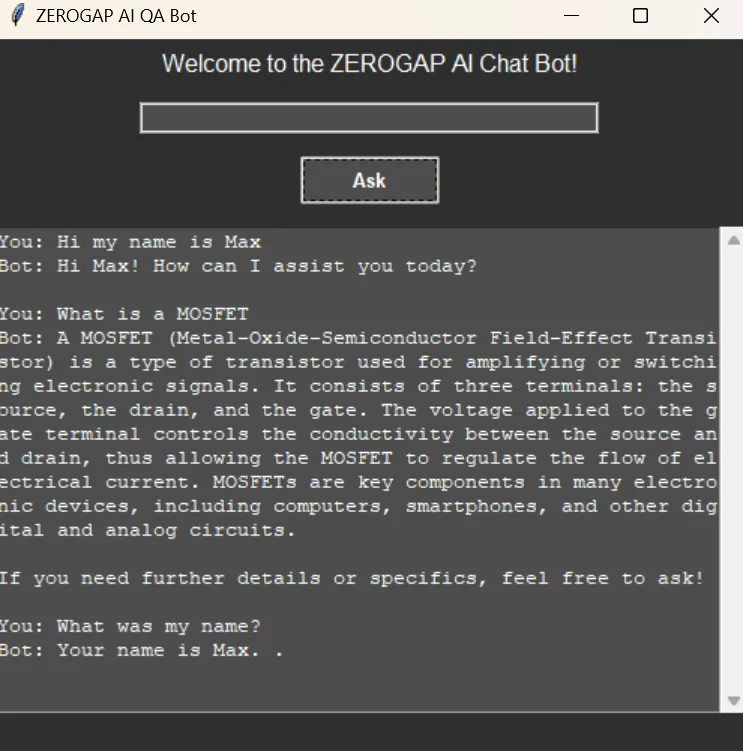
Configurar la Interfaz Gráfica
Configuramos la interfaz gráfica utilizando tkinter:
import threading
import tkinter as tk
import tkinter.ttk as ttk
from tkinter import scrolledtext

def on_ask():
    def run_query():
        question = question_entry.get()
        if question.lower() == "quit":
            root.destroy()
        else:
            loading_var.set("Loading...")
            progress_bar.pack(pady=5)
            progress_bar.start()
            root.update_idletasks()
            result = run_agent(question)
            loading_var.set("")
            progress_bar.stop()
            progress_bar.pack_forget()
            result_text.config(state=tk.NORMAL)
            result_text.insert(tk.END, f"You: {question}\nBot: {result}\n\n")
            result_text.config(state=tk.DISABLED)
            question_entry.delete(0, tk.END)

    threading.Thread(target=run_query).start()

root = tk.Tk()
root.title("ZEROGAP AI QA Bot")
root.configure(bg="#2e2e2e")

style = ttk.Style()
style.theme_use("clam")
style.configure("TLabel", background="#2e2e2e", foreground="#ffffff", font=("Helvetica", 12))
style.configure("TEntry", fieldbackground="#4d4d4d", foreground="#ffffff")
style.configure("TButton", background="#4d4d4d", foreground="#ffffff", font=("Helvetica", 10, "bold"))
style.map("TButton", background=[("active", "#5e5e5e")])

ttk.Label(root, text="Welcome to the ZEROGAP AI Chat Bot!").pack(pady=5)

question_entry = ttk.Entry(root, width=50)
question_entry.pack(pady=10)

ask_button = ttk.Button(root, text="Ask", command=on_ask)
ask_button.pack(pady=5)

result_text = scrolledtext.ScrolledText(root, width=60, height=20, state=tk.DISABLED, bg="#4d4d4d", fg="#ffffff", insertbackground="#ffffff")
result_text.pack(pady=10)

loading_var = tk.StringVar()
loading_label = ttk.Label(root, textvariable=loading_var, background="#2e2e2e", foreground="#ffffff", font=("Helvetica", 12))
loading_label.pack(pady=5)
loading_var.set("")

progress_bar = ttk.Progressbar(root, mode='indeterminate')

root.mainloop()
Código completo
import os
import threading
import tkinter as tk
import tkinter.ttk as ttk
from tkinter import scrolledtext
from azure.identity import ChainedTokenCredential, EnvironmentCredential
from langchain_openai import AzureOpenAIEmbeddings, AzureChatOpenAI
from langchain.vectorstores import Qdrant
from autogen import register_function, ConversableAgent
from dotenv import load_dotenv

# Load environment variables from .env file
load_dotenv()

# Instructions for setting up the environment and installing necessary packages

# 1. Install the required Python packages:
#    Use the following pip command to install all necessary packages in one go:
# pip install langchain langchain-qdrant qdrant-client azure-identity pyautogen dotenv langchain-openai

# 2. Set up the .env file:
#    Create a file named `.env` in the `qdrant_agents` directory with the following content:
#    ```
#    AZURE_TENANT_ID = "your-azure-tenant-id"
#    AZURE_CLIENT_ID = "your-azure-client-id"
#    AZURE_CLIENT_SECRET = "your-azure-client-secret"
#    ```
#    Replace `your-azure-tenant-id`, `your-azure-client-id`, and `your-azure-client-secret` with your actual Azure credentials.

# Set up Azure credentials and access token
credential = ChainedTokenCredential(EnvironmentCredential())
access_token = credential.get_token("https://cognitiveservices.azure.com/.default")

# Set OS environment variables
os.environ.update({
    "AZURE_OPENAI_ENDPOINT": "https://zerogap.openai.azure.com/",
    "AZURE_OPENAI_API_KEY": access_token.token,
    "OPENAI_API_TYPE": "azure_ad",
    "OPENAI_DEPLOYMENT": "gpt-4o"
})

# Initialize the OpenAI models
llm = AzureChatOpenAI(openai_api_version="2023-07-01-preview", azure_deployment="gpt-4o", temperature=0.5)
embeddings = AzureOpenAIEmbeddings(azure_deployment="embedding", openai_api_version="2023-07-01-preview", chunk_size=1)

# Configuration for AutoGen Agent
config_list = [{
    "model": "gpt-4o",
    "api_type": "azure",
    "api_key": os.environ['AZURE_OPENAI_API_KEY'],
    "base_url": os.environ["AZURE_OPENAI_ENDPOINT"],
    "api_version": "2024-02-01"
}]

# Load the vector database from existing collection
vector_store = Qdrant.from_existing_collection(embeddings, path="c:\\zeroQB\\", collection_name="zero_collection")
retriever = vector_store.as_retriever()

# Format documents for display
# Formats a list of documents into a single string for display.
# Args:
#     docs (list): List of document objects.
# Returns:
#     str: Formatted string of document contents.
def format_docs(docs):
    return "\n\n".join(doc.page_content for doc in docs) if docs else ""

# Tool for the Agent to answer questions
# Retrieves documents related to the given question from the vector store.
# Args:
#     question (str): The question to query the vector store.
# Returns:
#     str: Formatted string of document contents or a message if no information is found.
def get_documents(question: str) -> str:
    context = retriever.invoke(question)
    return format_docs(context) if context else "No information found in the Zerogap Documents."

# Chat history
chat_history = []

# Set up Conversable Agents
user_proxy = ConversableAgent(
    name="User",
    is_termination_msg=lambda msg: msg.get("content") is not None and "TERMINATE" in msg["content"],
    human_input_mode="NEVER",
    default_auto_reply="TERMINATE",
)

assistant = ConversableAgent(
    name="Assistant",
    system_message="""You are the ZeroGap AI Bot. You help users with their questions. Follow these instructions step by step:
    1. Answer the user's question you can use any tool available or the chat history.
    2. You end every response with 'TERMINATE'.""",
    llm_config={"config_list": config_list, "cache_seed": None},
    human_input_mode="NEVER",
)

condenser = ConversableAgent(
    name="Condenser",
    system_message="""Your job is to summarize the chat history, keeping the most relevant information. ONLY return the summary, without any other text.""",
    llm_config={"config_list": config_list, "cache_seed": None},
    human_input_mode="NEVER",
)

# Register the Document tool
register_function(
    get_documents,
    caller=assistant,
    executor=user_proxy,
    name="get_documents",
    description="Gets information from Zerogap Documents",
)

# Chat history handler
# Handles the chat history by condensing it into a summary.
# Returns:
#     str: Summary of the chat history.
def chat_history_handler():
    if chat_history:
        summary = "Chat history: " + "\n".join(chat_history)
        # Condense the chat history
        result = user_proxy.initiate_chat(
            condenser,
            message=summary,
            summary_method="last_msg",
            max_turns=1,
        )
        return "Chat history summary: " + result.summary
    return ""

# Chat history parser
# Parses the chat result and updates the chat history.
# Args:
#     chat_result (object): The result object from the chat.
def chat_history_parser(chat_result):
    for msg in chat_result.chat_history:
        if 'name' in msg:
            chat_history.append(f"{msg['name']}: {msg['content']}")

# Run the agent
# Runs the agent to process the given query.
# Args:
#     query (str): The user's query.
# Returns:
#     str: The summary of the agent's response.
def run_agent(query):
    chat_history_context = chat_history_handler()
    chat_result = user_proxy.initiate_chat(
        assistant,
        message=f"{query}\n{chat_history_context}",
        summary_method="last_msg",
        max_turns=2,
    )
    # Parse chat history
    chat_history_parser(chat_result)
    return chat_result.summary

# Handle user input and display results
# Handles the 'Ask' button click event, runs the agent query, and updates the GUI with the result.
def on_ask():
    def run_query():
        question = question_entry.get()
        if question.lower() == "quit":
            root.destroy()
        else:
            loading_var.set("Loading...")
            progress_bar.pack(pady=5)
            progress_bar.start()
            root.update_idletasks()
            result = run_agent(question)
            loading_var.set("")
            progress_bar.stop()
            progress_bar.pack_forget()
            result_text.config(state=tk.NORMAL)
            result_text.insert(tk.END, f"You: {question}\nBot: {result}\n\n")
            result_text.config(state=tk.DISABLED)
            question_entry.delete(0, tk.END)

    threading.Thread(target=run_query).start()

# Set up the GUI with a dark theme
root = tk.Tk()
root.title("ZEROGAP AI QA Bot")
root.configure(bg="#2e2e2e")

# Style configuration
style = ttk.Style()
style.theme_use("clam")
style.configure("TLabel", background="#2e2e2e", foreground="#ffffff", font=("Helvetica", 12))
style.configure("TEntry", fieldbackground="#4d4d4d", foreground="#ffffff")
style.configure("TButton", background="#4d4d4d", foreground="#ffffff", font=("Helvetica", 10, "bold"))
style.map("TButton", background=[("active", "#5e5e5e")])

# Welcome labels
ttk.Label(root, text="Welcome to the ZEROGAP AI Chat Bot!").pack(pady=5)

# Question entry
question_entry = ttk.Entry(root, width=50)
question_entry.pack(pady=10)

# Fancy Ask button
ask_button = ttk.Button(root, text="Ask", command=on_ask)
ask_button.pack(pady=5)

# Result text area
result_text = scrolledtext.ScrolledText(root, width=60, height=20, state=tk.DISABLED, bg="#4d4d4d", fg="#ffffff", insertbackground="#ffffff")
result_text.pack(pady=10)

# Loading bar
loading_var = tk.StringVar()
loading_label = ttk.Label(root, textvariable=loading_var, background="#2e2e2e", foreground="#ffffff", font=("Helvetica", 12))
loading_label.pack(pady=5)
loading_var.set("")

# Add a progress bar
progress_bar = ttk.Progressbar(root, mode='indeterminate')

root.mainloop()
AI Platform Engineer & Full-Stack Developer
Building Enterprise Integrations & Automations
- Qué es realmente un LLM — y cómo medirlo con Artificial Analysis - septiembre 12, 2026
- AI SDLC: un compendio de buenas prácticas para desarrollar con IA - junio 19, 2026
- Agentic Patterns y las Muchas Caras del RAG - mayo 25, 2026