
Chatbot de IA com RAG, memória e interface de usuário
Traduzido do original em espanhol. Ler em espanhol
Neste tutorial, vamos explorar como desenvolver um chatbot com inteligência artificial usando RAG, o Qdrant como nosso banco de dados vetorial e um agente para gerenciar a memória. Além disso, vamos integrar uma interface gráfica de usuário (GUI).
Qdrant VS Chroma DB
O Qdrant também é um banco de dados vetorial. O ChromaDB é ideal para desenvolvedores que querem integrar bancos vetoriais a modelos de IA de forma rápida e simples, enquanto o Qdrant é mais adequado para soluções empresariais que precisam de alto desempenho e escalabilidade.
Pré-requisitos
Instalação dos pacotes necessários
Para começar, precisamos instalar todos os pacotes Python necessários. Use o seguinte comando pip para instalá-los de uma vez:
pip install langchain langchain-qdrant qdrant-client azure-identity pyautogen dotenv langchain-openaiConfiguração do arquivo .env
Crie um arquivo chamado .env no diretório com o seguinte conteúdo:
AZURE_TENANT_ID = "your-azure-tenant-id"
AZURE_CLIENT_ID = "your-azure-client-id"
AZURE_CLIENT_SECRET = "your-azure-client-secret"
Substitua your-azure-tenant-id, your-azure-client-id e your-azure-client-secret pelas suas credenciais reais do Azure.
Criar o Vector DB
Criamos um cliente do Qdrant e definimos uma coleção para armazenar nossos vetores.
from qdrant_client import QdrantClient
from qdrant_client.http.models import Distance, VectorParams

client = QdrantClient(path="c:\\zeroQB\\")

client.create_collection(
    collection_name="zero_collection",
    vectors_config=VectorParams(size=3072, distance=Distance.COSINE),
)
Por fim, geramos IDs únicos para cada fragmento do documento e o adicionamos ao Qdrant.
from langchain_qdrant import QdrantVectorStore

vector_store = QdrantVectorStore(
    client=client,
    collection_name="zero_collection",
    embedding=embeddings,
)

uuids = [str(uuid4()) for _ in range(len(docs))]

vector_store.add_documents(documents=docs, ids=uuids)
O código passo a passo
Carregar as variáveis de ambiente
Primeiro, carregamos as variáveis de ambiente do arquivo .env:
from dotenv import load_dotenv
load_dotenv()
Configuração das credenciais do Azure e do token de acesso
Configuramos as credenciais do Azure e obtemos o token de acesso:
import os
from azure.identity import ChainedTokenCredential, EnvironmentCredential

credential = ChainedTokenCredential(EnvironmentCredential())
access_token = credential.get_token("https://cognitiveservices.azure.com/.default")

os.environ.update({
    "AZURE_OPENAI_ENDPOINT": "https://zerogap.openai.azure.com/",
    "AZURE_OPENAI_API_KEY": access_token.token,
    "OPENAI_API_TYPE": "azure_ad",
    "OPENAI_DEPLOYMENT": "gpt-4o"
})
Inicialização dos modelos da OpenAI
Inicializamos os modelos da OpenAI:
from langchain_openai import AzureOpenAIEmbeddings, AzureChatOpenAI

llm = AzureChatOpenAI(openai_api_version="2023-07-01-preview", azure_deployment="gpt-4o", temperature=0.5)
embeddings = AzureOpenAIEmbeddings(azure_deployment="embedding", openai_api_version="2023-07-01-preview", chunk_size=1)
Configuração do agente do AutoGen
Configuramos o agente do AutoGen:
config_list = [{
    "model": "gpt-4o",
    "api_type": "azure",
    "api_key": os.environ['AZURE_OPENAI_API_KEY'],
    "base_url": os.environ["AZURE_OPENAI_ENDPOINT"],
    "api_version": "2024-02-01"
}]
Carregar o banco de dados vetorial
Carregamos o banco de dados vetorial a partir de uma coleção existente:
from langchain.vectorstores import Qdrant

vector_store = Qdrant.from_existing_collection(embeddings, path="c:\\zeroQB\\", collection_name="zero_collection")
retriever = vector_store.as_retriever()
Formatar documentos para exibição
Formatamos uma lista de documentos em uma única string para exibição:
def format_docs(docs):
    return "\n\n".join(doc.page_content for doc in docs) if docs else ""
Ferramenta para o agente
Ferramenta para o agente responder perguntas usando o BD:
def get_documents(question: str) -> str:
    context = retriever.invoke(question)
    return format_docs(context) if context else "No information found in the Zerogap Documents."
Histórico do chat
Gerenciamos o histórico do chat usando um agente para gerar um resumo da conversa. Essa abordagem nos permite reduzir a quantidade de tokens necessária para processar as interações seguintes.
chat_history = []

def chat_history_handler():
    if chat_history:
        summary = "Chat history: " + "\n".join(chat_history)
        result = user_proxy.initiate_chat(
            condenser,
            message=summary,
            summary_method="last_msg",
            max_turns=1,
        )
        return "Chat history summary: " + result.summary
    return ""

def chat_history_parser(chat_result):
    for msg in chat_result.chat_history:
        if 'name' in msg:
            chat_history.append(f"{msg['name']}: {msg['content']}")
Executar o agente
Definimos a execução do agente para processar a consulta do usuário:
def run_agent(query):
    chat_history_context = chat_history_handler()
    chat_result = user_proxy.initiate_chat(
        assistant,
        message=f"{query}\n{chat_history_context}",
        summary_method="last_msg",
        max_turns=2,
    )
    chat_history_parser(chat_result)
    return chat_result.summary
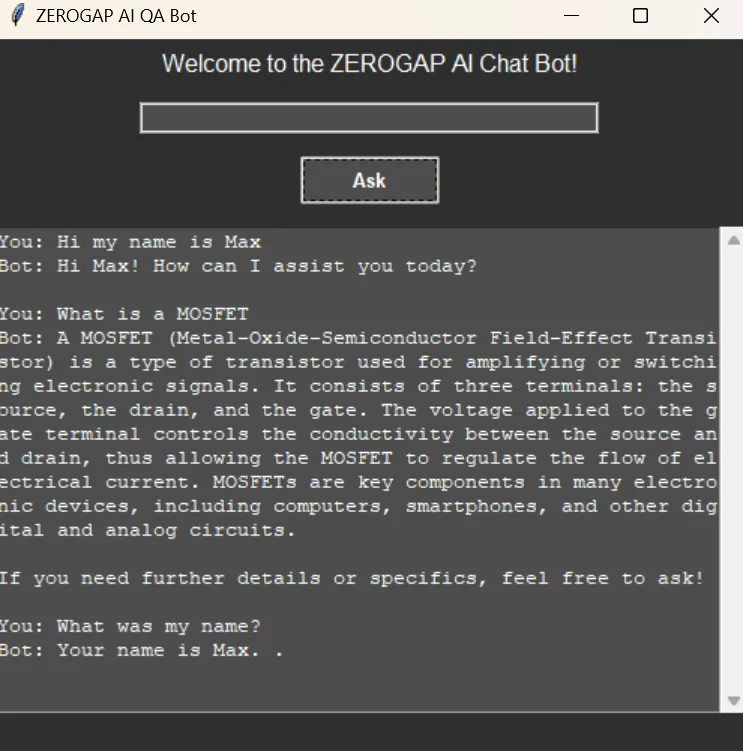
Configurar a interface gráfica
Configuramos a interface gráfica usando tkinter:
import threading
import tkinter as tk
import tkinter.ttk as ttk
from tkinter import scrolledtext

def on_ask():
    def run_query():
        question = question_entry.get()
        if question.lower() == "quit":
            root.destroy()
        else:
            loading_var.set("Loading...")
            progress_bar.pack(pady=5)
            progress_bar.start()
            root.update_idletasks()
            result = run_agent(question)
            loading_var.set("")
            progress_bar.stop()
            progress_bar.pack_forget()
            result_text.config(state=tk.NORMAL)
            result_text.insert(tk.END, f"You: {question}\nBot: {result}\n\n")
            result_text.config(state=tk.DISABLED)
            question_entry.delete(0, tk.END)

    threading.Thread(target=run_query).start()

root = tk.Tk()
root.title("ZEROGAP AI QA Bot")
root.configure(bg="#2e2e2e")

style = ttk.Style()
style.theme_use("clam")
style.configure("TLabel", background="#2e2e2e", foreground="#ffffff", font=("Helvetica", 12))
style.configure("TEntry", fieldbackground="#4d4d4d", foreground="#ffffff")
style.configure("TButton", background="#4d4d4d", foreground="#ffffff", font=("Helvetica", 10, "bold"))
style.map("TButton", background=[("active", "#5e5e5e")])

ttk.Label(root, text="Welcome to the ZEROGAP AI Chat Bot!").pack(pady=5)

question_entry = ttk.Entry(root, width=50)
question_entry.pack(pady=10)

ask_button = ttk.Button(root, text="Ask", command=on_ask)
ask_button.pack(pady=5)

result_text = scrolledtext.ScrolledText(root, width=60, height=20, state=tk.DISABLED, bg="#4d4d4d", fg="#ffffff", insertbackground="#ffffff")
result_text.pack(pady=10)

loading_var = tk.StringVar()
loading_label = ttk.Label(root, textvariable=loading_var, background="#2e2e2e", foreground="#ffffff", font=("Helvetica", 12))
loading_label.pack(pady=5)
loading_var.set("")

progress_bar = ttk.Progressbar(root, mode='indeterminate')

root.mainloop()
Código completo
import os
import threading
import tkinter as tk
import tkinter.ttk as ttk
from tkinter import scrolledtext
from azure.identity import ChainedTokenCredential, EnvironmentCredential
from langchain_openai import AzureOpenAIEmbeddings, AzureChatOpenAI
from langchain.vectorstores import Qdrant
from autogen import register_function, ConversableAgent
from dotenv import load_dotenv

# Load environment variables from .env file
load_dotenv()

# Instructions for setting up the environment and installing necessary packages

# 1. Install the required Python packages:
#    Use the following pip command to install all necessary packages in one go:
# pip install langchain langchain-qdrant qdrant-client azure-identity pyautogen dotenv langchain-openai

# 2. Set up the .env file:
#    Create a file named `.env` in the `qdrant_agents` directory with the following content:
#    ```
#    AZURE_TENANT_ID = "your-azure-tenant-id"
#    AZURE_CLIENT_ID = "your-azure-client-id"
#    AZURE_CLIENT_SECRET = "your-azure-client-secret"
#    ```
#    Replace `your-azure-tenant-id`, `your-azure-client-id`, and `your-azure-client-secret` with your actual Azure credentials.

# Set up Azure credentials and access token
credential = ChainedTokenCredential(EnvironmentCredential())
access_token = credential.get_token("https://cognitiveservices.azure.com/.default")

# Set OS environment variables
os.environ.update({
    "AZURE_OPENAI_ENDPOINT": "https://zerogap.openai.azure.com/",
    "AZURE_OPENAI_API_KEY": access_token.token,
    "OPENAI_API_TYPE": "azure_ad",
    "OPENAI_DEPLOYMENT": "gpt-4o"
})

# Initialize the OpenAI models
llm = AzureChatOpenAI(openai_api_version="2023-07-01-preview", azure_deployment="gpt-4o", temperature=0.5)
embeddings = AzureOpenAIEmbeddings(azure_deployment="embedding", openai_api_version="2023-07-01-preview", chunk_size=1)

# Configuration for AutoGen Agent
config_list = [{
    "model": "gpt-4o",
    "api_type": "azure",
    "api_key": os.environ['AZURE_OPENAI_API_KEY'],
    "base_url": os.environ["AZURE_OPENAI_ENDPOINT"],
    "api_version": "2024-02-01"
}]

# Load the vector database from existing collection
vector_store = Qdrant.from_existing_collection(embeddings, path="c:\\zeroQB\\", collection_name="zero_collection")
retriever = vector_store.as_retriever()

# Format documents for display
# Formats a list of documents into a single string for display.
# Args:
#     docs (list): List of document objects.
# Returns:
#     str: Formatted string of document contents.
def format_docs(docs):
    return "\n\n".join(doc.page_content for doc in docs) if docs else ""

# Tool for the Agent to answer questions
# Retrieves documents related to the given question from the vector store.
# Args:
#     question (str): The question to query the vector store.
# Returns:
#     str: Formatted string of document contents or a message if no information is found.
def get_documents(question: str) -> str:
    context = retriever.invoke(question)
    return format_docs(context) if context else "No information found in the Zerogap Documents."

# Chat history
chat_history = []

# Set up Conversable Agents
user_proxy = ConversableAgent(
    name="User",
    is_termination_msg=lambda msg: msg.get("content") is not None and "TERMINATE" in msg["content"],
    human_input_mode="NEVER",
    default_auto_reply="TERMINATE",
)

assistant = ConversableAgent(
    name="Assistant",
    system_message="""You are the ZeroGap AI Bot. You help users with their questions. Follow these instructions step by step:
    1. Answer the user's question you can use any tool available or the chat history.
    2. You end every response with 'TERMINATE'.""",
    llm_config={"config_list": config_list, "cache_seed": None},
    human_input_mode="NEVER",
)

condenser = ConversableAgent(
    name="Condenser",
    system_message="""Your job is to summarize the chat history, keeping the most relevant information. ONLY return the summary, without any other text.""",
    llm_config={"config_list": config_list, "cache_seed": None},
    human_input_mode="NEVER",
)

# Register the Document tool
register_function(
    get_documents,
    caller=assistant,
    executor=user_proxy,
    name="get_documents",
    description="Gets information from Zerogap Documents",
)

# Chat history handler
# Handles the chat history by condensing it into a summary.
# Returns:
#     str: Summary of the chat history.
def chat_history_handler():
    if chat_history:
        summary = "Chat history: " + "\n".join(chat_history)
        # Condense the chat history
        result = user_proxy.initiate_chat(
            condenser,
            message=summary,
            summary_method="last_msg",
            max_turns=1,
        )
        return "Chat history summary: " + result.summary
    return ""

# Chat history parser
# Parses the chat result and updates the chat history.
# Args:
#     chat_result (object): The result object from the chat.
def chat_history_parser(chat_result):
    for msg in chat_result.chat_history:
        if 'name' in msg:
            chat_history.append(f"{msg['name']}: {msg['content']}")

# Run the agent
# Runs the agent to process the given query.
# Args:
#     query (str): The user's query.
# Returns:
#     str: The summary of the agent's response.
def run_agent(query):
    chat_history_context = chat_history_handler()
    chat_result = user_proxy.initiate_chat(
        assistant,
        message=f"{query}\n{chat_history_context}",
        summary_method="last_msg",
        max_turns=2,
    )
    # Parse chat history
    chat_history_parser(chat_result)
    return chat_result.summary

# Handle user input and display results
# Handles the 'Ask' button click event, runs the agent query, and updates the GUI with the result.
def on_ask():
    def run_query():
        question = question_entry.get()
        if question.lower() == "quit":
            root.destroy()
        else:
            loading_var.set("Loading...")
            progress_bar.pack(pady=5)
            progress_bar.start()
            root.update_idletasks()
            result = run_agent(question)
            loading_var.set("")
            progress_bar.stop()
            progress_bar.pack_forget()
            result_text.config(state=tk.NORMAL)
            result_text.insert(tk.END, f"You: {question}\nBot: {result}\n\n")
            result_text.config(state=tk.DISABLED)
            question_entry.delete(0, tk.END)

    threading.Thread(target=run_query).start()

# Set up the GUI with a dark theme
root = tk.Tk()
root.title("ZEROGAP AI QA Bot")
root.configure(bg="#2e2e2e")

# Style configuration
style = ttk.Style()
style.theme_use("clam")
style.configure("TLabel", background="#2e2e2e", foreground="#ffffff", font=("Helvetica", 12))
style.configure("TEntry", fieldbackground="#4d4d4d", foreground="#ffffff")
style.configure("TButton", background="#4d4d4d", foreground="#ffffff", font=("Helvetica", 10, "bold"))
style.map("TButton", background=[("active", "#5e5e5e")])

# Welcome labels
ttk.Label(root, text="Welcome to the ZEROGAP AI Chat Bot!").pack(pady=5)

# Question entry
question_entry = ttk.Entry(root, width=50)
question_entry.pack(pady=10)

# Fancy Ask button
ask_button = ttk.Button(root, text="Ask", command=on_ask)
ask_button.pack(pady=5)

# Result text area
result_text = scrolledtext.ScrolledText(root, width=60, height=20, state=tk.DISABLED, bg="#4d4d4d", fg="#ffffff", insertbackground="#ffffff")
result_text.pack(pady=10)

# Loading bar
loading_var = tk.StringVar()
loading_label = ttk.Label(root, textvariable=loading_var, background="#2e2e2e", foreground="#ffffff", font=("Helvetica", 12))
loading_label.pack(pady=5)
loading_var.set("")

# Add a progress bar
progress_bar = ttk.Progressbar(root, mode='indeterminate')

root.mainloop()
AI Platform Engineer & Full-Stack Developer
Building Enterprise Integrations & Automations
- O que é realmente um LLM — e como medi-lo com o Artificial Analysis - 12 de setembro de 2026
- AI SDLC: um compêndio de boas práticas para desenvolver com IA - 19 de junho de 2026
- Agentic Patterns e as muitas faces do RAG - 25 de maio de 2026