
Chatbot IA con RAG, memoria e un'interfaccia utente
Tradotto dall'originale in spagnolo. Leggi in spagnolo
In questo tutorial vedremo come sviluppare un chatbot basato sull’intelligenza artificiale usando RAG, Qdrant come database vettoriale e un agente per gestire la memoria. Integreremo anche un’interfaccia grafica utente (GUI).
Qdrant VS Chroma DB
Anche Qdrant è un database vettoriale. ChromaDB è ideale per gli sviluppatori che vogliono integrare database vettoriali nei modelli di IA in modo rapido e semplice, mentre Qdrant è più adatto a soluzioni aziendali che richiedono prestazioni elevate e scalabilità.
Prerequisiti
Installazione dei pacchetti necessari
Per iniziare dobbiamo installare tutti i pacchetti Python richiesti. Usa il seguente comando pip per installarli tutti in una volta:
pip install langchain langchain-qdrant qdrant-client azure-identity pyautogen dotenv langchain-openaiConfigurazione del file .env
Crea un file chiamato .env nella cartella con il seguente contenuto:
AZURE_TENANT_ID = "your-azure-tenant-id"
AZURE_CLIENT_ID = "your-azure-client-id"
AZURE_CLIENT_SECRET = "your-azure-client-secret"
Sostituisci your-azure-tenant-id, your-azure-client-id e your-azure-client-secret con le tue credenziali reali di Azure.
Creare il Vector DB
Creiamo un client Qdrant e definiamo una collezione per memorizzare i nostri vettori.
from qdrant_client import QdrantClient
from qdrant_client.http.models import Distance, VectorParams

client = QdrantClient(path="c:\\zeroQB\\")

client.create_collection(
    collection_name="zero_collection",
    vectors_config=VectorParams(size=3072, distance=Distance.COSINE),
)
Infine generiamo ID univoci per ogni frammento del documento e lo aggiungiamo a Qdrant.
from langchain_qdrant import QdrantVectorStore

vector_store = QdrantVectorStore(
    client=client,
    collection_name="zero_collection",
    embedding=embeddings,
)

uuids = [str(uuid4()) for _ in range(len(docs))]

vector_store.add_documents(documents=docs, ids=uuids)
Il codice passo passo
Caricare le variabili d’ambiente
Per prima cosa carichiamo le variabili d’ambiente dal file .env:
from dotenv import load_dotenv
load_dotenv()
Configurazione delle credenziali di Azure e del token di accesso
Configuriamo le credenziali di Azure e otteniamo il token di accesso:
import os
from azure.identity import ChainedTokenCredential, EnvironmentCredential

credential = ChainedTokenCredential(EnvironmentCredential())
access_token = credential.get_token("https://cognitiveservices.azure.com/.default")

os.environ.update({
    "AZURE_OPENAI_ENDPOINT": "https://zerogap.openai.azure.com/",
    "AZURE_OPENAI_API_KEY": access_token.token,
    "OPENAI_API_TYPE": "azure_ad",
    "OPENAI_DEPLOYMENT": "gpt-4o"
})
Inizializzazione dei modelli di OpenAI
Inizializziamo i modelli di OpenAI:
from langchain_openai import AzureOpenAIEmbeddings, AzureChatOpenAI

llm = AzureChatOpenAI(openai_api_version="2023-07-01-preview", azure_deployment="gpt-4o", temperature=0.5)
embeddings = AzureOpenAIEmbeddings(azure_deployment="embedding", openai_api_version="2023-07-01-preview", chunk_size=1)
Configurazione dell’agente AutoGen
Configuriamo l’agente AutoGen:
config_list = [{
    "model": "gpt-4o",
    "api_type": "azure",
    "api_key": os.environ['AZURE_OPENAI_API_KEY'],
    "base_url": os.environ["AZURE_OPENAI_ENDPOINT"],
    "api_version": "2024-02-01"
}]
Caricare il database vettoriale
Carichiamo il database vettoriale da una collezione esistente:
from langchain.vectorstores import Qdrant

vector_store = Qdrant.from_existing_collection(embeddings, path="c:\\zeroQB\\", collection_name="zero_collection")
retriever = vector_store.as_retriever()
Formattare i documenti per la visualizzazione
Formattiamo un elenco di documenti in un’unica stringa da mostrare:
def format_docs(docs):
    return "\n\n".join(doc.page_content for doc in docs) if docs else ""
Strumento per l’agente
Strumento con cui l’agente risponde alle domande usando il DB:
def get_documents(question: str) -> str:
    context = retriever.invoke(question)
    return format_docs(context) if context else "No information found in the Zerogap Documents."
Cronologia della chat
Gestiamo la cronologia della chat usando un agente che genera un riassunto della conversazione. Questo approccio ci permette di ridurre il numero di token necessari per elaborare le interazioni successive.
chat_history = []

def chat_history_handler():
    if chat_history:
        summary = "Chat history: " + "\n".join(chat_history)
        result = user_proxy.initiate_chat(
            condenser,
            message=summary,
            summary_method="last_msg",
            max_turns=1,
        )
        return "Chat history summary: " + result.summary
    return ""

def chat_history_parser(chat_result):
    for msg in chat_result.chat_history:
        if 'name' in msg:
            chat_history.append(f"{msg['name']}: {msg['content']}")
Eseguire l’agente
Definiamo l’esecuzione dell’agente per elaborare la richiesta dell’utente:
def run_agent(query):
    chat_history_context = chat_history_handler()
    chat_result = user_proxy.initiate_chat(
        assistant,
        message=f"{query}\n{chat_history_context}",
        summary_method="last_msg",
        max_turns=2,
    )
    chat_history_parser(chat_result)
    return chat_result.summary
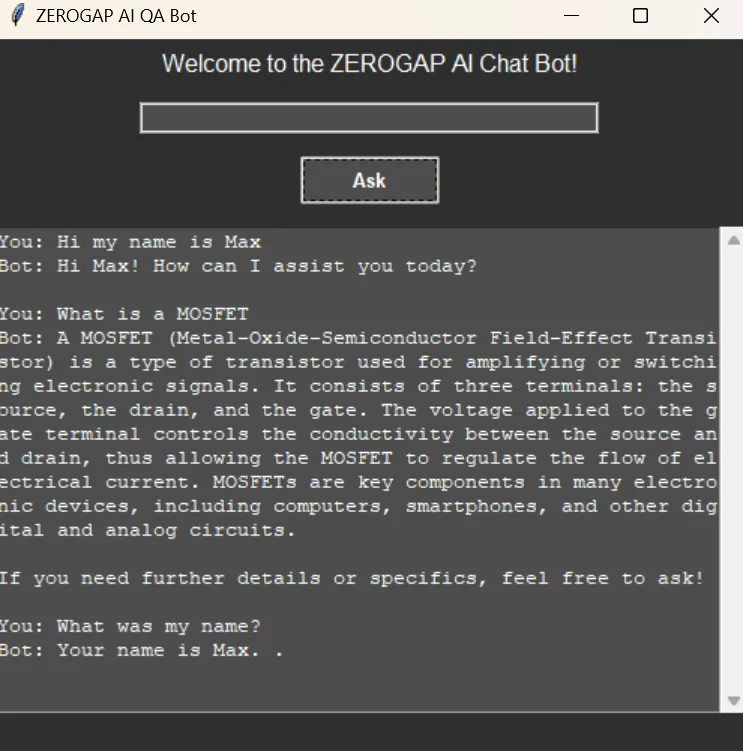
Configurare l’interfaccia grafica
Configuriamo l’interfaccia grafica usando tkinter:
import threading
import tkinter as tk
import tkinter.ttk as ttk
from tkinter import scrolledtext

def on_ask():
    def run_query():
        question = question_entry.get()
        if question.lower() == "quit":
            root.destroy()
        else:
            loading_var.set("Loading...")
            progress_bar.pack(pady=5)
            progress_bar.start()
            root.update_idletasks()
            result = run_agent(question)
            loading_var.set("")
            progress_bar.stop()
            progress_bar.pack_forget()
            result_text.config(state=tk.NORMAL)
            result_text.insert(tk.END, f"You: {question}\nBot: {result}\n\n")
            result_text.config(state=tk.DISABLED)
            question_entry.delete(0, tk.END)

    threading.Thread(target=run_query).start()

root = tk.Tk()
root.title("ZEROGAP AI QA Bot")
root.configure(bg="#2e2e2e")

style = ttk.Style()
style.theme_use("clam")
style.configure("TLabel", background="#2e2e2e", foreground="#ffffff", font=("Helvetica", 12))
style.configure("TEntry", fieldbackground="#4d4d4d", foreground="#ffffff")
style.configure("TButton", background="#4d4d4d", foreground="#ffffff", font=("Helvetica", 10, "bold"))
style.map("TButton", background=[("active", "#5e5e5e")])

ttk.Label(root, text="Welcome to the ZEROGAP AI Chat Bot!").pack(pady=5)

question_entry = ttk.Entry(root, width=50)
question_entry.pack(pady=10)

ask_button = ttk.Button(root, text="Ask", command=on_ask)
ask_button.pack(pady=5)

result_text = scrolledtext.ScrolledText(root, width=60, height=20, state=tk.DISABLED, bg="#4d4d4d", fg="#ffffff", insertbackground="#ffffff")
result_text.pack(pady=10)

loading_var = tk.StringVar()
loading_label = ttk.Label(root, textvariable=loading_var, background="#2e2e2e", foreground="#ffffff", font=("Helvetica", 12))
loading_label.pack(pady=5)
loading_var.set("")

progress_bar = ttk.Progressbar(root, mode='indeterminate')

root.mainloop()
Codice completo
import os
import threading
import tkinter as tk
import tkinter.ttk as ttk
from tkinter import scrolledtext
from azure.identity import ChainedTokenCredential, EnvironmentCredential
from langchain_openai import AzureOpenAIEmbeddings, AzureChatOpenAI
from langchain.vectorstores import Qdrant
from autogen import register_function, ConversableAgent
from dotenv import load_dotenv

# Load environment variables from .env file
load_dotenv()

# Instructions for setting up the environment and installing necessary packages

# 1. Install the required Python packages:
#    Use the following pip command to install all necessary packages in one go:
# pip install langchain langchain-qdrant qdrant-client azure-identity pyautogen dotenv langchain-openai

# 2. Set up the .env file:
#    Create a file named `.env` in the `qdrant_agents` directory with the following content:
#    ```
#    AZURE_TENANT_ID = "your-azure-tenant-id"
#    AZURE_CLIENT_ID = "your-azure-client-id"
#    AZURE_CLIENT_SECRET = "your-azure-client-secret"
#    ```
#    Replace `your-azure-tenant-id`, `your-azure-client-id`, and `your-azure-client-secret` with your actual Azure credentials.

# Set up Azure credentials and access token
credential = ChainedTokenCredential(EnvironmentCredential())
access_token = credential.get_token("https://cognitiveservices.azure.com/.default")

# Set OS environment variables
os.environ.update({
    "AZURE_OPENAI_ENDPOINT": "https://zerogap.openai.azure.com/",
    "AZURE_OPENAI_API_KEY": access_token.token,
    "OPENAI_API_TYPE": "azure_ad",
    "OPENAI_DEPLOYMENT": "gpt-4o"
})

# Initialize the OpenAI models
llm = AzureChatOpenAI(openai_api_version="2023-07-01-preview", azure_deployment="gpt-4o", temperature=0.5)
embeddings = AzureOpenAIEmbeddings(azure_deployment="embedding", openai_api_version="2023-07-01-preview", chunk_size=1)

# Configuration for AutoGen Agent
config_list = [{
    "model": "gpt-4o",
    "api_type": "azure",
    "api_key": os.environ['AZURE_OPENAI_API_KEY'],
    "base_url": os.environ["AZURE_OPENAI_ENDPOINT"],
    "api_version": "2024-02-01"
}]

# Load the vector database from existing collection
vector_store = Qdrant.from_existing_collection(embeddings, path="c:\\zeroQB\\", collection_name="zero_collection")
retriever = vector_store.as_retriever()

# Format documents for display
# Formats a list of documents into a single string for display.
# Args:
#     docs (list): List of document objects.
# Returns:
#     str: Formatted string of document contents.
def format_docs(docs):
    return "\n\n".join(doc.page_content for doc in docs) if docs else ""

# Tool for the Agent to answer questions
# Retrieves documents related to the given question from the vector store.
# Args:
#     question (str): The question to query the vector store.
# Returns:
#     str: Formatted string of document contents or a message if no information is found.
def get_documents(question: str) -> str:
    context = retriever.invoke(question)
    return format_docs(context) if context else "No information found in the Zerogap Documents."

# Chat history
chat_history = []

# Set up Conversable Agents
user_proxy = ConversableAgent(
    name="User",
    is_termination_msg=lambda msg: msg.get("content") is not None and "TERMINATE" in msg["content"],
    human_input_mode="NEVER",
    default_auto_reply="TERMINATE",
)

assistant = ConversableAgent(
    name="Assistant",
    system_message="""You are the ZeroGap AI Bot. You help users with their questions. Follow these instructions step by step:
    1. Answer the user's question you can use any tool available or the chat history.
    2. You end every response with 'TERMINATE'.""",
    llm_config={"config_list": config_list, "cache_seed": None},
    human_input_mode="NEVER",
)

condenser = ConversableAgent(
    name="Condenser",
    system_message="""Your job is to summarize the chat history, keeping the most relevant information. ONLY return the summary, without any other text.""",
    llm_config={"config_list": config_list, "cache_seed": None},
    human_input_mode="NEVER",
)

# Register the Document tool
register_function(
    get_documents,
    caller=assistant,
    executor=user_proxy,
    name="get_documents",
    description="Gets information from Zerogap Documents",
)

# Chat history handler
# Handles the chat history by condensing it into a summary.
# Returns:
#     str: Summary of the chat history.
def chat_history_handler():
    if chat_history:
        summary = "Chat history: " + "\n".join(chat_history)
        # Condense the chat history
        result = user_proxy.initiate_chat(
            condenser,
            message=summary,
            summary_method="last_msg",
            max_turns=1,
        )
        return "Chat history summary: " + result.summary
    return ""

# Chat history parser
# Parses the chat result and updates the chat history.
# Args:
#     chat_result (object): The result object from the chat.
def chat_history_parser(chat_result):
    for msg in chat_result.chat_history:
        if 'name' in msg:
            chat_history.append(f"{msg['name']}: {msg['content']}")

# Run the agent
# Runs the agent to process the given query.
# Args:
#     query (str): The user's query.
# Returns:
#     str: The summary of the agent's response.
def run_agent(query):
    chat_history_context = chat_history_handler()
    chat_result = user_proxy.initiate_chat(
        assistant,
        message=f"{query}\n{chat_history_context}",
        summary_method="last_msg",
        max_turns=2,
    )
    # Parse chat history
    chat_history_parser(chat_result)
    return chat_result.summary

# Handle user input and display results
# Handles the 'Ask' button click event, runs the agent query, and updates the GUI with the result.
def on_ask():
    def run_query():
        question = question_entry.get()
        if question.lower() == "quit":
            root.destroy()
        else:
            loading_var.set("Loading...")
            progress_bar.pack(pady=5)
            progress_bar.start()
            root.update_idletasks()
            result = run_agent(question)
            loading_var.set("")
            progress_bar.stop()
            progress_bar.pack_forget()
            result_text.config(state=tk.NORMAL)
            result_text.insert(tk.END, f"You: {question}\nBot: {result}\n\n")
            result_text.config(state=tk.DISABLED)
            question_entry.delete(0, tk.END)

    threading.Thread(target=run_query).start()

# Set up the GUI with a dark theme
root = tk.Tk()
root.title("ZEROGAP AI QA Bot")
root.configure(bg="#2e2e2e")

# Style configuration
style = ttk.Style()
style.theme_use("clam")
style.configure("TLabel", background="#2e2e2e", foreground="#ffffff", font=("Helvetica", 12))
style.configure("TEntry", fieldbackground="#4d4d4d", foreground="#ffffff")
style.configure("TButton", background="#4d4d4d", foreground="#ffffff", font=("Helvetica", 10, "bold"))
style.map("TButton", background=[("active", "#5e5e5e")])

# Welcome labels
ttk.Label(root, text="Welcome to the ZEROGAP AI Chat Bot!").pack(pady=5)

# Question entry
question_entry = ttk.Entry(root, width=50)
question_entry.pack(pady=10)

# Fancy Ask button
ask_button = ttk.Button(root, text="Ask", command=on_ask)
ask_button.pack(pady=5)

# Result text area
result_text = scrolledtext.ScrolledText(root, width=60, height=20, state=tk.DISABLED, bg="#4d4d4d", fg="#ffffff", insertbackground="#ffffff")
result_text.pack(pady=10)

# Loading bar
loading_var = tk.StringVar()
loading_label = ttk.Label(root, textvariable=loading_var, background="#2e2e2e", foreground="#ffffff", font=("Helvetica", 12))
loading_label.pack(pady=5)
loading_var.set("")

# Add a progress bar
progress_bar = ttk.Progressbar(root, mode='indeterminate')

root.mainloop()
AI Platform Engineer & Full-Stack Developer
Building Enterprise Integrations & Automations
- Che cos'è davvero un LLM — e come misurarlo con Artificial Analysis - 12 settembre 2026
- AI SDLC: una raccolta di buone pratiche per sviluppare con l'IA - 19 giugno 2026
- Agentic Patterns e le molte facce del RAG - 25 maggio 2026