
Chatbot IA avec RAG, mémoire et interface utilisateur
Traduit de l'original en espagnol. Lire en espagnol
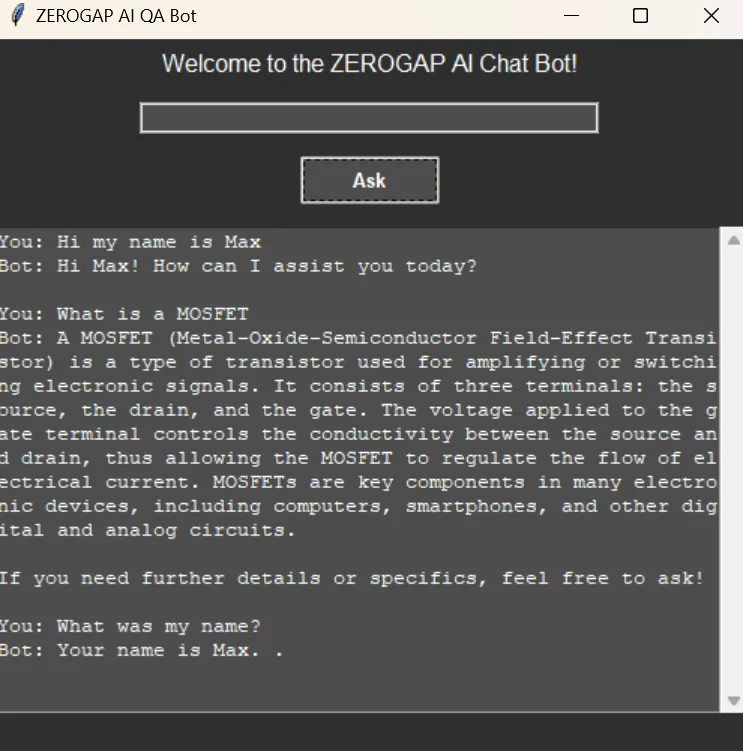
Dans ce tutoriel, nous allons voir comment développer un chatbot propulsé par l’intelligence artificielle à l’aide de RAG, de Qdrant comme base de données vectorielle et d’un agent chargé de gérer la mémoire. Nous y intégrerons également une interface graphique (GUI).
Qdrant VS Chroma DB
Qdrant est lui aussi une base de données vectorielle. ChromaDB est idéal pour les développeurs qui veulent intégrer rapidement et simplement une base vectorielle à des modèles d’IA, tandis que Qdrant convient mieux aux solutions d’entreprise qui exigent performances élevées et scalabilité.
Prérequis
Installation des paquets nécessaires
Pour commencer, nous devons installer tous les paquets Python requis. Utilisez la commande pip suivante pour les installer en une seule fois :
pip install langchain langchain-qdrant qdrant-client azure-identity pyautogen dotenv langchain-openaiConfiguration du fichier .env
Créez un fichier nommé .env dans le répertoire avec le contenu suivant :
AZURE_TENANT_ID = "your-azure-tenant-id"
AZURE_CLIENT_ID = "your-azure-client-id"
AZURE_CLIENT_SECRET = "your-azure-client-secret"
Remplacez your-azure-tenant-id, your-azure-client-id et your-azure-client-secret par vos véritables identifiants Azure.
Créer la base vectorielle
Nous créons un client Qdrant et définissons une collection pour stocker nos vecteurs.
from qdrant_client import QdrantClient
from qdrant_client.http.models import Distance, VectorParams

client = QdrantClient(path="c:\\zeroQB\\")

client.create_collection(
    collection_name="zero_collection",
    vectors_config=VectorParams(size=3072, distance=Distance.COSINE),
)
Enfin, nous générons des ID uniques pour chaque fragment du document et l’ajoutons à Qdrant.
from langchain_qdrant import QdrantVectorStore

vector_store = QdrantVectorStore(
    client=client,
    collection_name="zero_collection",
    embedding=embeddings,
)

uuids = [str(uuid4()) for _ in range(len(docs))]

vector_store.add_documents(documents=docs, ids=uuids)
Le code pas à pas
Charger les variables d’environnement
D’abord, nous chargeons les variables d’environnement depuis le fichier .env :
from dotenv import load_dotenv
load_dotenv()
Configuration des identifiants Azure et du token d’accès
Nous configurons les identifiants Azure et obtenons le token d’accès :
import os
from azure.identity import ChainedTokenCredential, EnvironmentCredential

credential = ChainedTokenCredential(EnvironmentCredential())
access_token = credential.get_token("https://cognitiveservices.azure.com/.default")

os.environ.update({
    "AZURE_OPENAI_ENDPOINT": "https://zerogap.openai.azure.com/",
    "AZURE_OPENAI_API_KEY": access_token.token,
    "OPENAI_API_TYPE": "azure_ad",
    "OPENAI_DEPLOYMENT": "gpt-4o"
})
Initialisation des modèles OpenAI
Nous initialisons les modèles OpenAI :
from langchain_openai import AzureOpenAIEmbeddings, AzureChatOpenAI

llm = AzureChatOpenAI(openai_api_version="2023-07-01-preview", azure_deployment="gpt-4o", temperature=0.5)
embeddings = AzureOpenAIEmbeddings(azure_deployment="embedding", openai_api_version="2023-07-01-preview", chunk_size=1)
Configuration de l’agent AutoGen
Nous configurons l’agent AutoGen :
config_list = [{
    "model": "gpt-4o",
    "api_type": "azure",
    "api_key": os.environ['AZURE_OPENAI_API_KEY'],
    "base_url": os.environ["AZURE_OPENAI_ENDPOINT"],
    "api_version": "2024-02-01"
}]
Charger la base de données vectorielle
Nous chargeons la base de données vectorielle à partir d’une collection existante :
from langchain.vectorstores import Qdrant

vector_store = Qdrant.from_existing_collection(embeddings, path="c:\\zeroQB\\", collection_name="zero_collection")
retriever = vector_store.as_retriever()
Formater les documents pour l’affichage
Nous formatons une liste de documents en une seule chaîne à afficher :
def format_docs(docs):
    return "\n\n".join(doc.page_content for doc in docs) if docs else ""
Outil pour l’agent
Un outil permettant à l’agent de répondre aux questions à partir de la base :
def get_documents(question: str) -> str:
    context = retriever.invoke(question)
    return format_docs(context) if context else "No information found in the Zerogap Documents."
Historique de conversation
Nous gérons l’historique de conversation en utilisant un agent qui génère un résumé de l’échange. Cette approche réduit le nombre de tokens nécessaires pour traiter les interactions suivantes.
chat_history = []

def chat_history_handler():
    if chat_history:
        summary = "Chat history: " + "\n".join(chat_history)
        result = user_proxy.initiate_chat(
            condenser,
            message=summary,
            summary_method="last_msg",
            max_turns=1,
        )
        return "Chat history summary: " + result.summary
    return ""

def chat_history_parser(chat_result):
    for msg in chat_result.chat_history:
        if 'name' in msg:
            chat_history.append(f"{msg['name']}: {msg['content']}")
Exécuter l’agent
Nous définissons l’exécution de l’agent pour traiter la requête de l’utilisateur :
def run_agent(query):
    chat_history_context = chat_history_handler()
    chat_result = user_proxy.initiate_chat(
        assistant,
        message=f"{query}\n{chat_history_context}",
        summary_method="last_msg",
        max_turns=2,
    )
    chat_history_parser(chat_result)
    return chat_result.summary
Configurer l’interface graphique
Nous configurons l’interface graphique avec tkinter :
import threading
import tkinter as tk
import tkinter.ttk as ttk
from tkinter import scrolledtext

def on_ask():
    def run_query():
        question = question_entry.get()
        if question.lower() == "quit":
            root.destroy()
        else:
            loading_var.set("Loading...")
            progress_bar.pack(pady=5)
            progress_bar.start()
            root.update_idletasks()
            result = run_agent(question)
            loading_var.set("")
            progress_bar.stop()
            progress_bar.pack_forget()
            result_text.config(state=tk.NORMAL)
            result_text.insert(tk.END, f"You: {question}\nBot: {result}\n\n")
            result_text.config(state=tk.DISABLED)
            question_entry.delete(0, tk.END)

    threading.Thread(target=run_query).start()

root = tk.Tk()
root.title("ZEROGAP AI QA Bot")
root.configure(bg="#2e2e2e")

style = ttk.Style()
style.theme_use("clam")
style.configure("TLabel", background="#2e2e2e", foreground="#ffffff", font=("Helvetica", 12))
style.configure("TEntry", fieldbackground="#4d4d4d", foreground="#ffffff")
style.configure("TButton", background="#4d4d4d", foreground="#ffffff", font=("Helvetica", 10, "bold"))
style.map("TButton", background=[("active", "#5e5e5e")])

ttk.Label(root, text="Welcome to the ZEROGAP AI Chat Bot!").pack(pady=5)

question_entry = ttk.Entry(root, width=50)
question_entry.pack(pady=10)

ask_button = ttk.Button(root, text="Ask", command=on_ask)
ask_button.pack(pady=5)

result_text = scrolledtext.ScrolledText(root, width=60, height=20, state=tk.DISABLED, bg="#4d4d4d", fg="#ffffff", insertbackground="#ffffff")
result_text.pack(pady=10)

loading_var = tk.StringVar()
loading_label = ttk.Label(root, textvariable=loading_var, background="#2e2e2e", foreground="#ffffff", font=("Helvetica", 12))
loading_label.pack(pady=5)
loading_var.set("")

progress_bar = ttk.Progressbar(root, mode='indeterminate')

root.mainloop()
Code complet
import os
import threading
import tkinter as tk
import tkinter.ttk as ttk
from tkinter import scrolledtext
from azure.identity import ChainedTokenCredential, EnvironmentCredential
from langchain_openai import AzureOpenAIEmbeddings, AzureChatOpenAI
from langchain.vectorstores import Qdrant
from autogen import register_function, ConversableAgent
from dotenv import load_dotenv

# Load environment variables from .env file
load_dotenv()

# Instructions for setting up the environment and installing necessary packages

# 1. Install the required Python packages:
#    Use the following pip command to install all necessary packages in one go:
# pip install langchain langchain-qdrant qdrant-client azure-identity pyautogen dotenv langchain-openai

# 2. Set up the .env file:
#    Create a file named `.env` in the `qdrant_agents` directory with the following content:
#    ```
#    AZURE_TENANT_ID = "your-azure-tenant-id"
#    AZURE_CLIENT_ID = "your-azure-client-id"
#    AZURE_CLIENT_SECRET = "your-azure-client-secret"
#    ```
#    Replace `your-azure-tenant-id`, `your-azure-client-id`, and `your-azure-client-secret` with your actual Azure credentials.

# Set up Azure credentials and access token
credential = ChainedTokenCredential(EnvironmentCredential())
access_token = credential.get_token("https://cognitiveservices.azure.com/.default")

# Set OS environment variables
os.environ.update({
    "AZURE_OPENAI_ENDPOINT": "https://zerogap.openai.azure.com/",
    "AZURE_OPENAI_API_KEY": access_token.token,
    "OPENAI_API_TYPE": "azure_ad",
    "OPENAI_DEPLOYMENT": "gpt-4o"
})

# Initialize the OpenAI models
llm = AzureChatOpenAI(openai_api_version="2023-07-01-preview", azure_deployment="gpt-4o", temperature=0.5)
embeddings = AzureOpenAIEmbeddings(azure_deployment="embedding", openai_api_version="2023-07-01-preview", chunk_size=1)

# Configuration for AutoGen Agent
config_list = [{
    "model": "gpt-4o",
    "api_type": "azure",
    "api_key": os.environ['AZURE_OPENAI_API_KEY'],
    "base_url": os.environ["AZURE_OPENAI_ENDPOINT"],
    "api_version": "2024-02-01"
}]

# Load the vector database from existing collection
vector_store = Qdrant.from_existing_collection(embeddings, path="c:\\zeroQB\\", collection_name="zero_collection")
retriever = vector_store.as_retriever()

# Format documents for display
# Formats a list of documents into a single string for display.
# Args:
#     docs (list): List of document objects.
# Returns:
#     str: Formatted string of document contents.
def format_docs(docs):
    return "\n\n".join(doc.page_content for doc in docs) if docs else ""

# Tool for the Agent to answer questions
# Retrieves documents related to the given question from the vector store.
# Args:
#     question (str): The question to query the vector store.
# Returns:
#     str: Formatted string of document contents or a message if no information is found.
def get_documents(question: str) -> str:
    context = retriever.invoke(question)
    return format_docs(context) if context else "No information found in the Zerogap Documents."

# Chat history
chat_history = []

# Set up Conversable Agents
user_proxy = ConversableAgent(
    name="User",
    is_termination_msg=lambda msg: msg.get("content") is not None and "TERMINATE" in msg["content"],
    human_input_mode="NEVER",
    default_auto_reply="TERMINATE",
)

assistant = ConversableAgent(
    name="Assistant",
    system_message="""You are the ZeroGap AI Bot. You help users with their questions. Follow these instructions step by step:
    1. Answer the user's question you can use any tool available or the chat history.
    2. You end every response with 'TERMINATE'.""",
    llm_config={"config_list": config_list, "cache_seed": None},
    human_input_mode="NEVER",
)

condenser = ConversableAgent(
    name="Condenser",
    system_message="""Your job is to summarize the chat history, keeping the most relevant information. ONLY return the summary, without any other text.""",
    llm_config={"config_list": config_list, "cache_seed": None},
    human_input_mode="NEVER",
)

# Register the Document tool
register_function(
    get_documents,
    caller=assistant,
    executor=user_proxy,
    name="get_documents",
    description="Gets information from Zerogap Documents",
)

# Chat history handler
# Handles the chat history by condensing it into a summary.
# Returns:
#     str: Summary of the chat history.
def chat_history_handler():
    if chat_history:
        summary = "Chat history: " + "\n".join(chat_history)
        # Condense the chat history
        result = user_proxy.initiate_chat(
            condenser,
            message=summary,
            summary_method="last_msg",
            max_turns=1,
        )
        return "Chat history summary: " + result.summary
    return ""

# Chat history parser
# Parses the chat result and updates the chat history.
# Args:
#     chat_result (object): The result object from the chat.
def chat_history_parser(chat_result):
    for msg in chat_result.chat_history:
        if 'name' in msg:
            chat_history.append(f"{msg['name']}: {msg['content']}")

# Run the agent
# Runs the agent to process the given query.
# Args:
#     query (str): The user's query.
# Returns:
#     str: The summary of the agent's response.
def run_agent(query):
    chat_history_context = chat_history_handler()
    chat_result = user_proxy.initiate_chat(
        assistant,
        message=f"{query}\n{chat_history_context}",
        summary_method="last_msg",
        max_turns=2,
    )
    # Parse chat history
    chat_history_parser(chat_result)
    return chat_result.summary

# Handle user input and display results
# Handles the 'Ask' button click event, runs the agent query, and updates the GUI with the result.
def on_ask():
    def run_query():
        question = question_entry.get()
        if question.lower() == "quit":
            root.destroy()
        else:
            loading_var.set("Loading...")
            progress_bar.pack(pady=5)
            progress_bar.start()
            root.update_idletasks()
            result = run_agent(question)
            loading_var.set("")
            progress_bar.stop()
            progress_bar.pack_forget()
            result_text.config(state=tk.NORMAL)
            result_text.insert(tk.END, f"You: {question}\nBot: {result}\n\n")
            result_text.config(state=tk.DISABLED)
            question_entry.delete(0, tk.END)

    threading.Thread(target=run_query).start()

# Set up the GUI with a dark theme
root = tk.Tk()
root.title("ZEROGAP AI QA Bot")
root.configure(bg="#2e2e2e")

# Style configuration
style = ttk.Style()
style.theme_use("clam")
style.configure("TLabel", background="#2e2e2e", foreground="#ffffff", font=("Helvetica", 12))
style.configure("TEntry", fieldbackground="#4d4d4d", foreground="#ffffff")
style.configure("TButton", background="#4d4d4d", foreground="#ffffff", font=("Helvetica", 10, "bold"))
style.map("TButton", background=[("active", "#5e5e5e")])

# Welcome labels
ttk.Label(root, text="Welcome to the ZEROGAP AI Chat Bot!").pack(pady=5)

# Question entry
question_entry = ttk.Entry(root, width=50)
question_entry.pack(pady=10)

# Fancy Ask button
ask_button = ttk.Button(root, text="Ask", command=on_ask)
ask_button.pack(pady=5)

# Result text area
result_text = scrolledtext.ScrolledText(root, width=60, height=20, state=tk.DISABLED, bg="#4d4d4d", fg="#ffffff", insertbackground="#ffffff")
result_text.pack(pady=10)

# Loading bar
loading_var = tk.StringVar()
loading_label = ttk.Label(root, textvariable=loading_var, background="#2e2e2e", foreground="#ffffff", font=("Helvetica", 12))
loading_label.pack(pady=5)
loading_var.set("")

# Add a progress bar
progress_bar = ttk.Progressbar(root, mode='indeterminate')

root.mainloop()
AI Platform Engineer & Full-Stack Developer
Building Enterprise Integrations & Automations
- Ce qu'est vraiment un LLM — et comment le mesurer avec Artificial Analysis - 12 septembre 2026
- AI SDLC : un recueil de bonnes pratiques pour développer avec l'IA - 19 juin 2026
- Agentic Patterns et les multiples visages du RAG - 25 mai 2026