
PowerShell GUI
Translated from the Spanish original. Read in Spanish
An example of a simple script with a GUI.
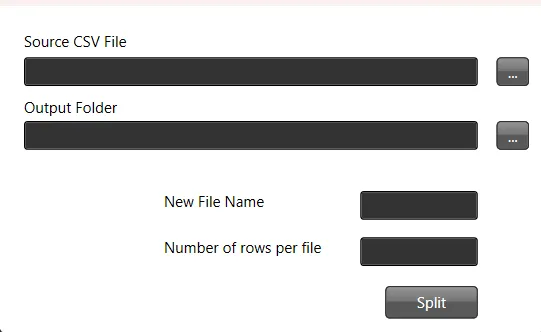
In this tutorial, we’ll create a PowerShell script that provides a graphical user interface (GUI) to split a CSV file into several files based on a given number of rows.
Step 1: Define the Function to Split the File
First, we define a function that handles splitting the CSV file. It needs the source path, the maximum number of rows per file, the destination path for the resulting files and a file name pattern.
function splitthefile($path_source_csv, $max_number_rows, $path_result_files, $filename) {
    # Do something
}
Step 2: Load the Assemblies Required for the GUI
Next, we load the .NET libraries needed to create the GUI.
Add-Type -AssemblyName PresentationFramework, PresentationCore, WindowsBase, System.Windows.Forms, System.DrawingStep 3: Customise the GUI Theme and Icons
The look of the GUI can be customised with themes and icons.
$ThemeFile = "$local_path\Themes\ExpressionDark.xaml"
$icon =  "$local_path\Themes\favicon.ico"
Step 4: Create the GUI Layout with XAML
Next, we define the GUI layout in XAML. You can use Visual Studio to generate the XAML visually.
$inputXML = @"
<Window x:Class="csv.MainWindow"
        xmlns="http://schemas.microsoft.com/winfx/2006/xaml/presentation"
        xmlns:x="http://schemas.microsoft.com/winfx/2006/xaml"
        xmlns:d="http://schemas.microsoft.com/expression/blend/2008"
        xmlns:mc="http://schemas.openxmlformats.org/markup-compatibility/2006"
        xmlns:local="clr-namespace:specialboackup"
        mc:Ignorable="d"
        Title="CSV Splitter" Height="300" Width="450" Icon="$icon">
        <Window.Resources>
        <ResourceDictionary>
           <ResourceDictionary.MergedDictionaries>
               <ResourceDictionary Source="$ThemeFile" />
           </ResourceDictionary.MergedDictionaries>
        </ResourceDictionary>
   </Window.Resources>
   <Grid>
        <Canvas HorizontalAlignment="Left" Height="251" Margin="10,10,0,0" VerticalAlignment="Top" Width="424">
            <Button x:Name="get_source" Content="..." Canvas.Left="388" Canvas.Top="31" Width="26" Height="23" RenderTransformOrigin="-0.963,1.375"/>
            <Button x:Name="split" Content="Split" Canvas.Left="299" Canvas.Top="214" Width="74" Height="26"/>
            <TextBox x:Name="source" HorizontalAlignment="Left" Height="23" TextWrapping="Wrap" VerticalAlignment="Top" Width="363" Canvas.Left="10" Canvas.Top="31" RenderTransformOrigin="0.5,1"/>
            <TextBlock HorizontalAlignment="Left" TextWrapping="Wrap" Text="Source CSV File" VerticalAlignment="Top" Canvas.Left="10" Canvas.Top="10" Width="348" Foreground="Black"/>
            <Button x:Name="get_output" Content="..." Canvas.Left="388" Canvas.Top="82" Width="26" Height="23" RenderTransformOrigin="-0.963,1.375"/>
            <TextBox x:Name="dest" HorizontalAlignment="Left" Height="23" TextWrapping="Wrap" VerticalAlignment="Top" Width="363" Canvas.Left="10" Canvas.Top="82" RenderTransformOrigin="0.5,1"/>
            <TextBlock HorizontalAlignment="Left" TextWrapping="Wrap" Text="Output Folder" VerticalAlignment="Top" Canvas.Left="10" Canvas.Top="63" Width="348" Foreground="Black"/>
            <TextBox x:Name="rows" HorizontalAlignment="Left" Height="23" TextWrapping="Wrap" VerticalAlignment="Top" Width="94" Canvas.Left="279" Canvas.Top="175" RenderTransformOrigin="0.5,1"/>
            <TextBlock HorizontalAlignment="Left" TextWrapping="Wrap" Text="Number of rows per file" VerticalAlignment="Top" Canvas.Left="122" Canvas.Top="175" Width="137" Height="23" Foreground="Black"/>
            <TextBox x:Name="filename" HorizontalAlignment="Left" Height="23" TextWrapping="Wrap" VerticalAlignment="Top" Width="94" Canvas.Left="279" Canvas.Top="138" RenderTransformOrigin="0.5,1"/>
            <TextBlock HorizontalAlignment="Left" TextWrapping="Wrap" Text="New File Name" VerticalAlignment="Top" Canvas.Left="122" Canvas.Top="138" Width="137" Height="23" Foreground="Black"/>
        </Canvas>
    </Grid>
</Window>
"@
Step 5: Parse the XAML to Create the GUI
The XAML string is processed to create the GUI objects.
$inputXML = $inputXML -replace 'mc:Ignorable="d"','' -replace "x:N",'N'  -replace '^<Win.*', '<Window'

[void][System.Reflection.Assembly]::LoadWithPartialName('presentationframework')
[xml]$XAML = $inputXML

$reader=(New-Object System.Xml.XmlNodeReader $xaml)
try {
   $Form=[Windows.Markup.XamlReader]::Load( $reader )
} catch {
   Write-Warning "Unable to parse XML, with error: $($Error[0])`n Ensure that there are NO SelectionChanged properties (PowerShell cannot process them)"
   throw
}
Step 6: Bind GUI Elements to Script Variables
We find every named element in the GUI and bind it to a script variable.
$xaml.SelectNodes("//*[@Name]") | %{"trying item $($_.Name)";
    try {Set-Variable -Name "WPF$($_.Name)" -Value $Form.FindName($_.Name) -ErrorAction Stop}
    catch{throw}
    }
Function Get-FormVariables {
 if ($global:ReadmeDisplay -ne $true) {
   Write-host "If you need to reference this display again, run Get-  FormVariables" -ForegroundColor Yellow;$global:ReadmeDisplay=$true
 }
 write-host "Found the following interactable elements from our form" - ForegroundColor Cyan
 get-variable WPF*
}
Step 7: Define Event Handlers for Button Clicks
Event handlers are attached to the buttons in the GUI to perform actions when they’re clicked.
$WPFget_source.Add_click({
    $WPFsource.Text=Get-File
})

$WPFget_output.Add_click({
    $WPFdest.Text=Get-Folder
})

$WPFsplit.Add_click({
    $number_rows=$WPFrows.Text.Trim()
    $path_source=$WPFsource.Text.Trim()
    $path_dest=$WPFdest.Text.Trim()
    $wshell = New-Object -ComObject Wscript.Shell
    splitthefile -path_source_csv $path_source -max_number_rows $number_rows  -path_result_files $path_dest -filename $WPFfilename.text.Trim()
    $wshell.Popup("Split complete",0,"Messsage",0x1)
})
Step 8: Show the GUI
Finally, we show the GUI and wait for the user to interact with it.
$Form.ShowDialog() | out-nullComplete PowerShell Script
Here is the complete PowerShell script as described in the steps above:
function splitthefile($path_source_csv, $max_number_rows, $path_result_files, $filename) {
 # Do something
}

Add-Type -AssemblyName PresentationFramework, PresentationCore, WindowsBase, System.Windows.Forms, System.Drawing

$ThemeFile = "$local_path\Themes\ExpressionDark.xaml"
$icon =  "$local_path\Themes\favicon.ico"

$inputXML = @"
<Window x:Class="csv.MainWindow"
        xmlns="http://schemas.microsoft.com/winfx/2006/xaml/presentation"
        xmlns:x="http://schemas.microsoft.com/winfx/2006/xaml"
        xmlns:d="http://schemas.microsoft.com/expression/blend/2008"
        xmlns:mc="http://schemas.openxmlformats.org/markup-compatibility/2006"
        xmlns:local="clr-namespace:specialboackup"
        mc:Ignorable="d"
        Title="CSV Splitter" Height="300" Width="450" Icon="$icon">
        <Window.Resources>
        <ResourceDictionary>
           <ResourceDictionary.MergedDictionaries>
               <ResourceDictionary Source="$ThemeFile" />
           </ResourceDictionary.MergedDictionaries>
        </ResourceDictionary>
   </Window.Resources>
   <Grid>
        <Canvas HorizontalAlignment="Left" Height="251" Margin="10,10,0,0" VerticalAlignment="Top" Width="424">
            <Button x:Name="get_source" Content="..." Canvas.Left="388" Canvas.Top="31" Width="26" Height="23" RenderTransformOrigin="-0.963,1.375"/>
            <Button x:Name="split" Content="Split" Canvas.Left="299" Canvas.Top="214" Width="74" Height="26"/>
            <TextBox x:Name="source" HorizontalAlignment="Left" Height="23" TextWrapping="Wrap" VerticalAlignment="Top" Width="363" Canvas.Left="10" Canvas.Top="31" RenderTransformOrigin="0.5,1"/>
            <TextBlock HorizontalAlignment="Left" TextWrapping="Wrap" Text="Source CSV File" VerticalAlignment="Top" Canvas.Left="10" Canvas.Top="10" Width="348" Foreground="Black"/>
            <Button x:Name="get_output" Content="..." Canvas.Left="388" Canvas.Top="82" Width="26" Height="23" RenderTransformOrigin="-0.963,1.375"/>
            <TextBox x:Name="dest" HorizontalAlignment="Left" Height="23" TextWrapping="Wrap" VerticalAlignment="Top" Width="363" Canvas.Left="10" Canvas.Top="82" RenderTransformOrigin="0.5,1"/>
            <TextBlock HorizontalAlignment="Left" TextWrapping="Wrap" Text="Output Folder" VerticalAlignment="Top" Canvas.Left="10" Canvas.Top="63" Width="348" Foreground="Black"/>
            <TextBox x:Name="rows" HorizontalAlignment="Left" Height="23" TextWrapping="Wrap" VerticalAlignment="Top" Width="94" Canvas.Left="279" Canvas.Top="175" RenderTransformOrigin="0.5,1"/>
            <TextBlock HorizontalAlignment="Left" TextWrapping="Wrap" Text="Number of rows per file" VerticalAlignment="Top" Canvas.Left="122" Canvas.Top="175" Width="137" Height="23" Foreground="Black"/>
            <TextBox x:Name="filename" HorizontalAlignment="Left" Height="23" TextWrapping="Wrap" VerticalAlignment="Top" Width="94" Canvas.Left="279" Canvas.Top="138" RenderTransformOrigin="0.5,1"/>
            <TextBlock HorizontalAlignment="Left" TextWrapping="Wrap" Text="New File Name" VerticalAlignment="Top" Canvas.Left="122" Canvas.Top="138" Width="137" Height="23" Foreground="Black"/>
        </Canvas>
    </Grid>
</Window>
"@

$inputXML = $inputXML -replace 'mc:Ignorable="d"','' -replace "x:N",'N'  -replace '^<Win.*', '<Window'

[void][System.Reflection.Assembly]::LoadWithPartialName('presentationframework')
[xml]$XAML = $inputXML

#Read XAML
$reader=(New-Object System.Xml.XmlNodeReader $xaml)
try{
   $Form=[Windows.Markup.XamlReader]::Load( $reader )
} catch {
    Write-Warning "Unable to parse XML, with error: $($Error[0])`n Ensure that there are NO SelectionChanged properties (PowerShell cannot process them)"
    throw
}

$xaml.SelectNodes("//*[@Name]") | %{"trying item $($_.Name)";
    try {Set-Variable -Name "WPF$($_.Name)" -Value $Form.FindName($_.Name) -ErrorAction Stop}
    catch{throw}
    }
Function Get-FormVariables {
 if ($global:ReadmeDisplay -ne $true) {
   Write-host "If you need to reference this display again, run Get-  FormVariables" -ForegroundColor Yellow;$global:ReadmeDisplay=$true
 }
 write-host "Found the following interactable elements from our form" - ForegroundColor Cyan
 get-variable WPF*
}

$WPFget_source.Add_click({
    $WPFsource.Text=Get-File
})

$WPFget_output.Add_click({
    $WPFdest.Text=Get-Folder
})

$WPFsplit.Add_click({
    $number_rows=$WPFrows.Text.Trim()
    $path_source=$WPFsource.Text.Trim()
    $path_dest=$WPFdest.Text.Trim()
    $wshell = New-Object -ComObject Wscript.Shell
    splitthefile -path_source_csv $path_source -max_number_rows $number_rows  -path_result_files $path_dest -filename $WPFfilename.text.Trim()
    $wshell.Popup("Split complete",0,"Messsage",0x1)
})

$Form.ShowDialog() | out-null
AI Platform Engineer & Full-Stack Developer
Building Enterprise Integrations & Automations
- What an LLM really is — and how to measure it with Artificial Analysis - 12 September 2026
- AI SDLC: a compendium of best practices for developing with AI - 19 June 2026
- Agentic Patterns and the Many Faces of RAG - 25 May 2026