
PowerShell GUI
Traduzido do original em espanhol. Ler em espanhol
Exemplo de um script simples com GUI.
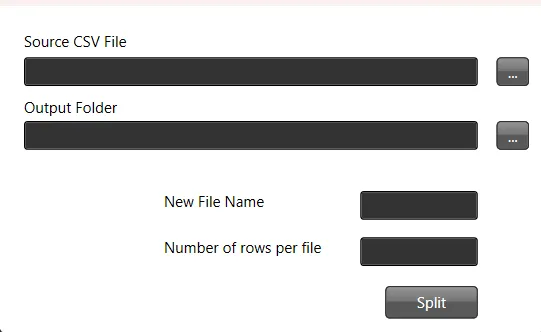
Neste tutorial, vamos criar um script PowerShell que oferece uma interface gráfica de usuário (GUI) para dividir um arquivo CSV em vários arquivos com base em um número definido de linhas.
Passo 1: Definir a função para dividir o arquivo
Primeiro, definimos uma função que cuidará da divisão do arquivo CSV. Ela precisa do caminho de origem, do número máximo de linhas por arquivo, do caminho de destino para os arquivos resultantes e de um padrão de nome de arquivo.
function splitthefile($path_source_csv, $max_number_rows, $path_result_files, $filename) {
    # Do something
}
Passo 2: Carregar os assemblies necessários para a GUI
Em seguida, carregamos as bibliotecas .NET necessárias para criar a GUI.
Add-Type -AssemblyName PresentationFramework, PresentationCore, WindowsBase, System.Windows.Forms, System.DrawingPasso 3: Personalizar o tema e os ícones da GUI
A aparência da GUI pode ser personalizada com temas e ícones.
$ThemeFile = "$local_path\Themes\ExpressionDark.xaml"
$icon =  "$local_path\Themes\favicon.ico"
Passo 4: Criar o layout da GUI com XAML
A seguir, definimos o layout da GUI em XAML. Você pode usar o Visual Studio para gerar o XAML de forma visual.
$inputXML = @"
<Window x:Class="csv.MainWindow"
        xmlns="http://schemas.microsoft.com/winfx/2006/xaml/presentation"
        xmlns:x="http://schemas.microsoft.com/winfx/2006/xaml"
        xmlns:d="http://schemas.microsoft.com/expression/blend/2008"
        xmlns:mc="http://schemas.openxmlformats.org/markup-compatibility/2006"
        xmlns:local="clr-namespace:specialboackup"
        mc:Ignorable="d"
        Title="CSV Splitter" Height="300" Width="450" Icon="$icon">
        <Window.Resources>
        <ResourceDictionary>
           <ResourceDictionary.MergedDictionaries>
               <ResourceDictionary Source="$ThemeFile" />
           </ResourceDictionary.MergedDictionaries>
        </ResourceDictionary>
   </Window.Resources>
   <Grid>
        <Canvas HorizontalAlignment="Left" Height="251" Margin="10,10,0,0" VerticalAlignment="Top" Width="424">
            <Button x:Name="get_source" Content="..." Canvas.Left="388" Canvas.Top="31" Width="26" Height="23" RenderTransformOrigin="-0.963,1.375"/>
            <Button x:Name="split" Content="Split" Canvas.Left="299" Canvas.Top="214" Width="74" Height="26"/>
            <TextBox x:Name="source" HorizontalAlignment="Left" Height="23" TextWrapping="Wrap" VerticalAlignment="Top" Width="363" Canvas.Left="10" Canvas.Top="31" RenderTransformOrigin="0.5,1"/>
            <TextBlock HorizontalAlignment="Left" TextWrapping="Wrap" Text="Source CSV File" VerticalAlignment="Top" Canvas.Left="10" Canvas.Top="10" Width="348" Foreground="Black"/>
            <Button x:Name="get_output" Content="..." Canvas.Left="388" Canvas.Top="82" Width="26" Height="23" RenderTransformOrigin="-0.963,1.375"/>
            <TextBox x:Name="dest" HorizontalAlignment="Left" Height="23" TextWrapping="Wrap" VerticalAlignment="Top" Width="363" Canvas.Left="10" Canvas.Top="82" RenderTransformOrigin="0.5,1"/>
            <TextBlock HorizontalAlignment="Left" TextWrapping="Wrap" Text="Output Folder" VerticalAlignment="Top" Canvas.Left="10" Canvas.Top="63" Width="348" Foreground="Black"/>
            <TextBox x:Name="rows" HorizontalAlignment="Left" Height="23" TextWrapping="Wrap" VerticalAlignment="Top" Width="94" Canvas.Left="279" Canvas.Top="175" RenderTransformOrigin="0.5,1"/>
            <TextBlock HorizontalAlignment="Left" TextWrapping="Wrap" Text="Number of rows per file" VerticalAlignment="Top" Canvas.Left="122" Canvas.Top="175" Width="137" Height="23" Foreground="Black"/>
            <TextBox x:Name="filename" HorizontalAlignment="Left" Height="23" TextWrapping="Wrap" VerticalAlignment="Top" Width="94" Canvas.Left="279" Canvas.Top="138" RenderTransformOrigin="0.5,1"/>
            <TextBlock HorizontalAlignment="Left" TextWrapping="Wrap" Text="New File Name" VerticalAlignment="Top" Canvas.Left="122" Canvas.Top="138" Width="137" Height="23" Foreground="Black"/>
        </Canvas>
    </Grid>
</Window>
"@
Passo 5: Analisar o XAML para criar a GUI
A string XAML é processada para criar os objetos da GUI.
$inputXML = $inputXML -replace 'mc:Ignorable="d"','' -replace "x:N",'N'  -replace '^<Win.*', '<Window'

[void][System.Reflection.Assembly]::LoadWithPartialName('presentationframework')
[xml]$XAML = $inputXML

$reader=(New-Object System.Xml.XmlNodeReader $xaml)
try {
   $Form=[Windows.Markup.XamlReader]::Load( $reader )
} catch {
   Write-Warning "Unable to parse XML, with error: $($Error[0])`n Ensure that there are NO SelectionChanged properties (PowerShell cannot process them)"
   throw
}
Passo 6: Vincular os elementos da GUI a variáveis do script
Localizamos todos os elementos nomeados na GUI e os vinculamos a variáveis do script.
$xaml.SelectNodes("//*[@Name]") | %{"trying item $($_.Name)";
    try {Set-Variable -Name "WPF$($_.Name)" -Value $Form.FindName($_.Name) -ErrorAction Stop}
    catch{throw}
    }
Function Get-FormVariables {
 if ($global:ReadmeDisplay -ne $true) {
   Write-host "If you need to reference this display again, run Get-  FormVariables" -ForegroundColor Yellow;$global:ReadmeDisplay=$true
 }
 write-host "Found the following interactable elements from our form" - ForegroundColor Cyan
 get-variable WPF*
}
Passo 7: Definir handlers de eventos para os cliques nos botões
Os handlers de eventos são associados aos botões da GUI para executar ações quando são clicados.
$WPFget_source.Add_click({
    $WPFsource.Text=Get-File
})

$WPFget_output.Add_click({
    $WPFdest.Text=Get-Folder
})

$WPFsplit.Add_click({
    $number_rows=$WPFrows.Text.Trim()
    $path_source=$WPFsource.Text.Trim()
    $path_dest=$WPFdest.Text.Trim()
    $wshell = New-Object -ComObject Wscript.Shell
    splitthefile -path_source_csv $path_source -max_number_rows $number_rows  -path_result_files $path_dest -filename $WPFfilename.text.Trim()
    $wshell.Popup("Split complete",0,"Messsage",0x1)
})
Passo 8: Exibir a GUI
Por fim, exibimos a GUI e esperamos que o usuário interaja com ela.
$Form.ShowDialog() | out-nullScript PowerShell completo
Aqui está o script PowerShell completo, conforme descrito nos passos anteriores:
function splitthefile($path_source_csv, $max_number_rows, $path_result_files, $filename) {
 # Do something
}

Add-Type -AssemblyName PresentationFramework, PresentationCore, WindowsBase, System.Windows.Forms, System.Drawing

$ThemeFile = "$local_path\Themes\ExpressionDark.xaml"
$icon =  "$local_path\Themes\favicon.ico"

$inputXML = @"
<Window x:Class="csv.MainWindow"
        xmlns="http://schemas.microsoft.com/winfx/2006/xaml/presentation"
        xmlns:x="http://schemas.microsoft.com/winfx/2006/xaml"
        xmlns:d="http://schemas.microsoft.com/expression/blend/2008"
        xmlns:mc="http://schemas.openxmlformats.org/markup-compatibility/2006"
        xmlns:local="clr-namespace:specialboackup"
        mc:Ignorable="d"
        Title="CSV Splitter" Height="300" Width="450" Icon="$icon">
        <Window.Resources>
        <ResourceDictionary>
           <ResourceDictionary.MergedDictionaries>
               <ResourceDictionary Source="$ThemeFile" />
           </ResourceDictionary.MergedDictionaries>
        </ResourceDictionary>
   </Window.Resources>
   <Grid>
        <Canvas HorizontalAlignment="Left" Height="251" Margin="10,10,0,0" VerticalAlignment="Top" Width="424">
            <Button x:Name="get_source" Content="..." Canvas.Left="388" Canvas.Top="31" Width="26" Height="23" RenderTransformOrigin="-0.963,1.375"/>
            <Button x:Name="split" Content="Split" Canvas.Left="299" Canvas.Top="214" Width="74" Height="26"/>
            <TextBox x:Name="source" HorizontalAlignment="Left" Height="23" TextWrapping="Wrap" VerticalAlignment="Top" Width="363" Canvas.Left="10" Canvas.Top="31" RenderTransformOrigin="0.5,1"/>
            <TextBlock HorizontalAlignment="Left" TextWrapping="Wrap" Text="Source CSV File" VerticalAlignment="Top" Canvas.Left="10" Canvas.Top="10" Width="348" Foreground="Black"/>
            <Button x:Name="get_output" Content="..." Canvas.Left="388" Canvas.Top="82" Width="26" Height="23" RenderTransformOrigin="-0.963,1.375"/>
            <TextBox x:Name="dest" HorizontalAlignment="Left" Height="23" TextWrapping="Wrap" VerticalAlignment="Top" Width="363" Canvas.Left="10" Canvas.Top="82" RenderTransformOrigin="0.5,1"/>
            <TextBlock HorizontalAlignment="Left" TextWrapping="Wrap" Text="Output Folder" VerticalAlignment="Top" Canvas.Left="10" Canvas.Top="63" Width="348" Foreground="Black"/>
            <TextBox x:Name="rows" HorizontalAlignment="Left" Height="23" TextWrapping="Wrap" VerticalAlignment="Top" Width="94" Canvas.Left="279" Canvas.Top="175" RenderTransformOrigin="0.5,1"/>
            <TextBlock HorizontalAlignment="Left" TextWrapping="Wrap" Text="Number of rows per file" VerticalAlignment="Top" Canvas.Left="122" Canvas.Top="175" Width="137" Height="23" Foreground="Black"/>
            <TextBox x:Name="filename" HorizontalAlignment="Left" Height="23" TextWrapping="Wrap" VerticalAlignment="Top" Width="94" Canvas.Left="279" Canvas.Top="138" RenderTransformOrigin="0.5,1"/>
            <TextBlock HorizontalAlignment="Left" TextWrapping="Wrap" Text="New File Name" VerticalAlignment="Top" Canvas.Left="122" Canvas.Top="138" Width="137" Height="23" Foreground="Black"/>
        </Canvas>
    </Grid>
</Window>
"@

$inputXML = $inputXML -replace 'mc:Ignorable="d"','' -replace "x:N",'N'  -replace '^<Win.*', '<Window'

[void][System.Reflection.Assembly]::LoadWithPartialName('presentationframework')
[xml]$XAML = $inputXML

#Read XAML
$reader=(New-Object System.Xml.XmlNodeReader $xaml)
try{
   $Form=[Windows.Markup.XamlReader]::Load( $reader )
} catch {
    Write-Warning "Unable to parse XML, with error: $($Error[0])`n Ensure that there are NO SelectionChanged properties (PowerShell cannot process them)"
    throw
}

$xaml.SelectNodes("//*[@Name]") | %{"trying item $($_.Name)";
    try {Set-Variable -Name "WPF$($_.Name)" -Value $Form.FindName($_.Name) -ErrorAction Stop}
    catch{throw}
    }
Function Get-FormVariables {
 if ($global:ReadmeDisplay -ne $true) {
   Write-host "If you need to reference this display again, run Get-  FormVariables" -ForegroundColor Yellow;$global:ReadmeDisplay=$true
 }
 write-host "Found the following interactable elements from our form" - ForegroundColor Cyan
 get-variable WPF*
}

$WPFget_source.Add_click({
    $WPFsource.Text=Get-File
})

$WPFget_output.Add_click({
    $WPFdest.Text=Get-Folder
})

$WPFsplit.Add_click({
    $number_rows=$WPFrows.Text.Trim()
    $path_source=$WPFsource.Text.Trim()
    $path_dest=$WPFdest.Text.Trim()
    $wshell = New-Object -ComObject Wscript.Shell
    splitthefile -path_source_csv $path_source -max_number_rows $number_rows  -path_result_files $path_dest -filename $WPFfilename.text.Trim()
    $wshell.Popup("Split complete",0,"Messsage",0x1)
})

$Form.ShowDialog() | out-null
AI Platform Engineer & Full-Stack Developer
Building Enterprise Integrations & Automations
- O que é realmente um LLM — e como medi-lo com o Artificial Analysis - 12 de setembro de 2026
- AI SDLC: um compêndio de boas práticas para desenvolver com IA - 19 de junho de 2026
- Agentic Patterns e as muitas faces do RAG - 25 de maio de 2026