
GUI con PowerShell
Tradotto dall'originale in spagnolo. Leggi in spagnolo
Esempio di un semplice script con GUI.
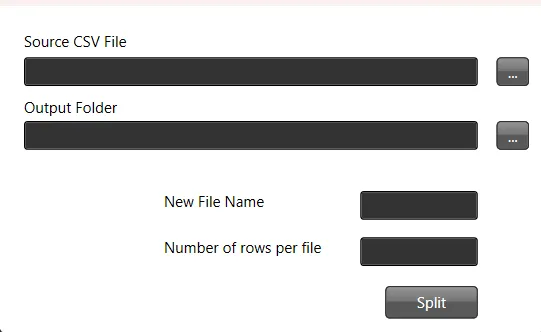
In questo tutorial creeremo uno script PowerShell che offre un’interfaccia grafica (GUI) per dividere un file CSV in più file in base a un numero di righe specificato.
Passo 1: definire la funzione per dividere il file
Per prima cosa definiamo una funzione che si occuperà di dividere il file CSV. Richiede il percorso di origine, il numero massimo di righe per file, il percorso di destinazione dei file risultanti e un modello per il nome dei file.
function splitthefile($path_source_csv, $max_number_rows, $path_result_files, $filename) {
    # Do something
}
Passo 2: caricare gli assembly necessari per la GUI
Poi carichiamo le librerie .NET necessarie per creare la GUI.
Add-Type -AssemblyName PresentationFramework, PresentationCore, WindowsBase, System.Windows.Forms, System.DrawingPasso 3: personalizzare il tema e le icone della GUI
L’aspetto della GUI si può personalizzare con temi e icone.
$ThemeFile = "$local_path\Themes\ExpressionDark.xaml"
$icon =  "$local_path\Themes\favicon.ico"
Passo 4: creare il layout della GUI con XAML
Quindi definiamo il layout della GUI in XAML. Puoi usare Visual Studio per generare lo XAML in modo visuale.
$inputXML = @"
<Window x:Class="csv.MainWindow"
        xmlns="http://schemas.microsoft.com/winfx/2006/xaml/presentation"
        xmlns:x="http://schemas.microsoft.com/winfx/2006/xaml"
        xmlns:d="http://schemas.microsoft.com/expression/blend/2008"
        xmlns:mc="http://schemas.openxmlformats.org/markup-compatibility/2006"
        xmlns:local="clr-namespace:specialboackup"
        mc:Ignorable="d"
        Title="CSV Splitter" Height="300" Width="450" Icon="$icon">
        <Window.Resources>
        <ResourceDictionary>
           <ResourceDictionary.MergedDictionaries>
               <ResourceDictionary Source="$ThemeFile" />
           </ResourceDictionary.MergedDictionaries>
        </ResourceDictionary>
   </Window.Resources>
   <Grid>
        <Canvas HorizontalAlignment="Left" Height="251" Margin="10,10,0,0" VerticalAlignment="Top" Width="424">
            <Button x:Name="get_source" Content="..." Canvas.Left="388" Canvas.Top="31" Width="26" Height="23" RenderTransformOrigin="-0.963,1.375"/>
            <Button x:Name="split" Content="Split" Canvas.Left="299" Canvas.Top="214" Width="74" Height="26"/>
            <TextBox x:Name="source" HorizontalAlignment="Left" Height="23" TextWrapping="Wrap" VerticalAlignment="Top" Width="363" Canvas.Left="10" Canvas.Top="31" RenderTransformOrigin="0.5,1"/>
            <TextBlock HorizontalAlignment="Left" TextWrapping="Wrap" Text="Source CSV File" VerticalAlignment="Top" Canvas.Left="10" Canvas.Top="10" Width="348" Foreground="Black"/>
            <Button x:Name="get_output" Content="..." Canvas.Left="388" Canvas.Top="82" Width="26" Height="23" RenderTransformOrigin="-0.963,1.375"/>
            <TextBox x:Name="dest" HorizontalAlignment="Left" Height="23" TextWrapping="Wrap" VerticalAlignment="Top" Width="363" Canvas.Left="10" Canvas.Top="82" RenderTransformOrigin="0.5,1"/>
            <TextBlock HorizontalAlignment="Left" TextWrapping="Wrap" Text="Output Folder" VerticalAlignment="Top" Canvas.Left="10" Canvas.Top="63" Width="348" Foreground="Black"/>
            <TextBox x:Name="rows" HorizontalAlignment="Left" Height="23" TextWrapping="Wrap" VerticalAlignment="Top" Width="94" Canvas.Left="279" Canvas.Top="175" RenderTransformOrigin="0.5,1"/>
            <TextBlock HorizontalAlignment="Left" TextWrapping="Wrap" Text="Number of rows per file" VerticalAlignment="Top" Canvas.Left="122" Canvas.Top="175" Width="137" Height="23" Foreground="Black"/>
            <TextBox x:Name="filename" HorizontalAlignment="Left" Height="23" TextWrapping="Wrap" VerticalAlignment="Top" Width="94" Canvas.Left="279" Canvas.Top="138" RenderTransformOrigin="0.5,1"/>
            <TextBlock HorizontalAlignment="Left" TextWrapping="Wrap" Text="New File Name" VerticalAlignment="Top" Canvas.Left="122" Canvas.Top="138" Width="137" Height="23" Foreground="Black"/>
        </Canvas>
    </Grid>
</Window>
"@
Passo 5: analizzare lo XAML per creare la GUI
La stringa XAML viene elaborata per creare gli oggetti della GUI.
$inputXML = $inputXML -replace 'mc:Ignorable="d"','' -replace "x:N",'N'  -replace '^<Win.*', '<Window'

[void][System.Reflection.Assembly]::LoadWithPartialName('presentationframework')
[xml]$XAML = $inputXML

$reader=(New-Object System.Xml.XmlNodeReader $xaml)
try {
   $Form=[Windows.Markup.XamlReader]::Load( $reader )
} catch {
   Write-Warning "Unable to parse XML, with error: $($Error[0])`n Ensure that there are NO SelectionChanged properties (PowerShell cannot process them)"
   throw
}
Passo 6: collegare gli elementi della GUI alle variabili dello script
Individuiamo tutti gli elementi con nome nella GUI e li colleghiamo a variabili dello script.
$xaml.SelectNodes("//*[@Name]") | %{"trying item $($_.Name)";
    try {Set-Variable -Name "WPF$($_.Name)" -Value $Form.FindName($_.Name) -ErrorAction Stop}
    catch{throw}
    }
Function Get-FormVariables {
 if ($global:ReadmeDisplay -ne $true) {
   Write-host "If you need to reference this display again, run Get-  FormVariables" -ForegroundColor Yellow;$global:ReadmeDisplay=$true
 }
 write-host "Found the following interactable elements from our form" - ForegroundColor Cyan
 get-variable WPF*
}
Passo 7: definire i gestori degli eventi per i clic sui pulsanti
I gestori degli eventi vengono associati ai pulsanti della GUI per eseguire azioni quando vengono cliccati.
$WPFget_source.Add_click({
    $WPFsource.Text=Get-File
})

$WPFget_output.Add_click({
    $WPFdest.Text=Get-Folder
})

$WPFsplit.Add_click({
    $number_rows=$WPFrows.Text.Trim()
    $path_source=$WPFsource.Text.Trim()
    $path_dest=$WPFdest.Text.Trim()
    $wshell = New-Object -ComObject Wscript.Shell
    splitthefile -path_source_csv $path_source -max_number_rows $number_rows  -path_result_files $path_dest -filename $WPFfilename.text.Trim()
    $wshell.Popup("Split complete",0,"Messsage",0x1)
})
Passo 8: mostrare la GUI
Infine mostriamo la GUI e attendiamo che l’utente interagisca con essa.
$Form.ShowDialog() | out-nullScript PowerShell completo
Ecco lo script PowerShell completo, come descritto nei passaggi precedenti:
function splitthefile($path_source_csv, $max_number_rows, $path_result_files, $filename) {
 # Do something
}

Add-Type -AssemblyName PresentationFramework, PresentationCore, WindowsBase, System.Windows.Forms, System.Drawing

$ThemeFile = "$local_path\Themes\ExpressionDark.xaml"
$icon =  "$local_path\Themes\favicon.ico"

$inputXML = @"
<Window x:Class="csv.MainWindow"
        xmlns="http://schemas.microsoft.com/winfx/2006/xaml/presentation"
        xmlns:x="http://schemas.microsoft.com/winfx/2006/xaml"
        xmlns:d="http://schemas.microsoft.com/expression/blend/2008"
        xmlns:mc="http://schemas.openxmlformats.org/markup-compatibility/2006"
        xmlns:local="clr-namespace:specialboackup"
        mc:Ignorable="d"
        Title="CSV Splitter" Height="300" Width="450" Icon="$icon">
        <Window.Resources>
        <ResourceDictionary>
           <ResourceDictionary.MergedDictionaries>
               <ResourceDictionary Source="$ThemeFile" />
           </ResourceDictionary.MergedDictionaries>
        </ResourceDictionary>
   </Window.Resources>
   <Grid>
        <Canvas HorizontalAlignment="Left" Height="251" Margin="10,10,0,0" VerticalAlignment="Top" Width="424">
            <Button x:Name="get_source" Content="..." Canvas.Left="388" Canvas.Top="31" Width="26" Height="23" RenderTransformOrigin="-0.963,1.375"/>
            <Button x:Name="split" Content="Split" Canvas.Left="299" Canvas.Top="214" Width="74" Height="26"/>
            <TextBox x:Name="source" HorizontalAlignment="Left" Height="23" TextWrapping="Wrap" VerticalAlignment="Top" Width="363" Canvas.Left="10" Canvas.Top="31" RenderTransformOrigin="0.5,1"/>
            <TextBlock HorizontalAlignment="Left" TextWrapping="Wrap" Text="Source CSV File" VerticalAlignment="Top" Canvas.Left="10" Canvas.Top="10" Width="348" Foreground="Black"/>
            <Button x:Name="get_output" Content="..." Canvas.Left="388" Canvas.Top="82" Width="26" Height="23" RenderTransformOrigin="-0.963,1.375"/>
            <TextBox x:Name="dest" HorizontalAlignment="Left" Height="23" TextWrapping="Wrap" VerticalAlignment="Top" Width="363" Canvas.Left="10" Canvas.Top="82" RenderTransformOrigin="0.5,1"/>
            <TextBlock HorizontalAlignment="Left" TextWrapping="Wrap" Text="Output Folder" VerticalAlignment="Top" Canvas.Left="10" Canvas.Top="63" Width="348" Foreground="Black"/>
            <TextBox x:Name="rows" HorizontalAlignment="Left" Height="23" TextWrapping="Wrap" VerticalAlignment="Top" Width="94" Canvas.Left="279" Canvas.Top="175" RenderTransformOrigin="0.5,1"/>
            <TextBlock HorizontalAlignment="Left" TextWrapping="Wrap" Text="Number of rows per file" VerticalAlignment="Top" Canvas.Left="122" Canvas.Top="175" Width="137" Height="23" Foreground="Black"/>
            <TextBox x:Name="filename" HorizontalAlignment="Left" Height="23" TextWrapping="Wrap" VerticalAlignment="Top" Width="94" Canvas.Left="279" Canvas.Top="138" RenderTransformOrigin="0.5,1"/>
            <TextBlock HorizontalAlignment="Left" TextWrapping="Wrap" Text="New File Name" VerticalAlignment="Top" Canvas.Left="122" Canvas.Top="138" Width="137" Height="23" Foreground="Black"/>
        </Canvas>
    </Grid>
</Window>
"@

$inputXML = $inputXML -replace 'mc:Ignorable="d"','' -replace "x:N",'N'  -replace '^<Win.*', '<Window'

[void][System.Reflection.Assembly]::LoadWithPartialName('presentationframework')
[xml]$XAML = $inputXML

#Read XAML
$reader=(New-Object System.Xml.XmlNodeReader $xaml)
try{
   $Form=[Windows.Markup.XamlReader]::Load( $reader )
} catch {
    Write-Warning "Unable to parse XML, with error: $($Error[0])`n Ensure that there are NO SelectionChanged properties (PowerShell cannot process them)"
    throw
}

$xaml.SelectNodes("//*[@Name]") | %{"trying item $($_.Name)";
    try {Set-Variable -Name "WPF$($_.Name)" -Value $Form.FindName($_.Name) -ErrorAction Stop}
    catch{throw}
    }
Function Get-FormVariables {
 if ($global:ReadmeDisplay -ne $true) {
   Write-host "If you need to reference this display again, run Get-  FormVariables" -ForegroundColor Yellow;$global:ReadmeDisplay=$true
 }
 write-host "Found the following interactable elements from our form" - ForegroundColor Cyan
 get-variable WPF*
}

$WPFget_source.Add_click({
    $WPFsource.Text=Get-File
})

$WPFget_output.Add_click({
    $WPFdest.Text=Get-Folder
})

$WPFsplit.Add_click({
    $number_rows=$WPFrows.Text.Trim()
    $path_source=$WPFsource.Text.Trim()
    $path_dest=$WPFdest.Text.Trim()
    $wshell = New-Object -ComObject Wscript.Shell
    splitthefile -path_source_csv $path_source -max_number_rows $number_rows  -path_result_files $path_dest -filename $WPFfilename.text.Trim()
    $wshell.Popup("Split complete",0,"Messsage",0x1)
})

$Form.ShowDialog() | out-null
AI Platform Engineer & Full-Stack Developer
Building Enterprise Integrations & Automations
- Che cos'è davvero un LLM — e come misurarlo con Artificial Analysis - 12 settembre 2026
- AI SDLC: una raccolta di buone pratiche per sviluppare con l'IA - 19 giugno 2026
- Agentic Patterns e le molte facce del RAG - 25 maggio 2026