
Phishing
Translated from the Spanish original. Read in Spanish
Here we’ll see how a third party can intercept a password while you log in to a web service, and I’ll show you a few details to watch out for so you can protect yourself. Before showing the example, though, it’s important to define a few concepts.
A common type of attack, and one many of you have probably heard of, is phishing. Basically, it’s a kind of deception that belongs to the category of “social engineering”. Why social engineering? It’s called that because it’s the set of attack methods that use information about how users behave with their computers and the internet. For example, a fake Hotmail email saying that if you don’t download a program or forward the email, your account will be closed. But what I find worth highlighting about this whole range of attacks is that prevention is much simpler than in other cases and is often solved just by understanding how the attack works. That’s why today my aim is for you to get to know this kind of attack and see it in action.
Phishing
One way to carry it out is to set up a fake website for a given service, hosted on computers or servers belonging to the attackers. That way, all the sensitive data entered on that screen is actually being handed over to someone else. The question you may have now is: when I go to, say, Facebook, I type “www.facebook.com” — how could I end up on a fake site? Without going into too much detail, what happens is that the attack involves interfering with the user’s communication with the legitimate site.
In this particular case, I thought it would be clearer for you to see the whole process in the video below. The attack you’ll see isn’t as subtle as it could be, but it’ll give you a good idea of how these attacks work in general.
But did it work?… What showed up on the attacker’s computer?
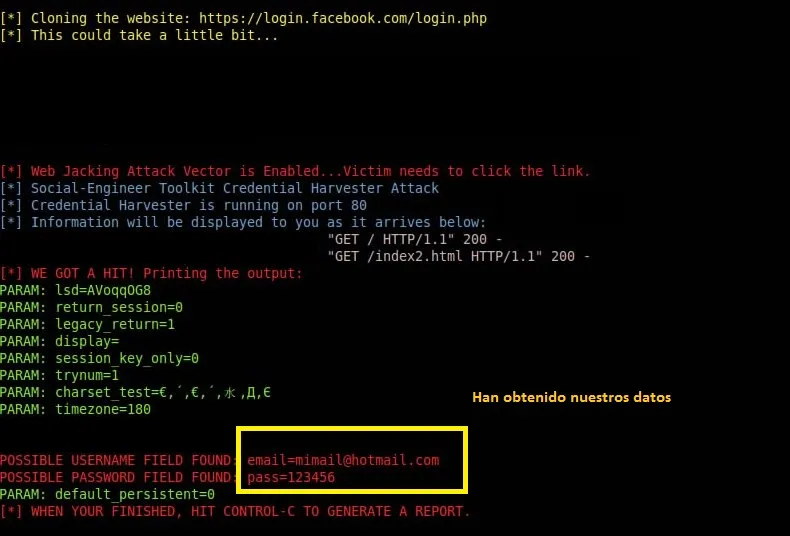
As you’ll have seen in the video, we can spot the following suspicious signs:
– The address that ends up in the address bar looks odd
– The service’s page doesn’t look the way it usually does
– A link may appear where the page itself should appear
– We enter our password and nothing happens.
In a more sophisticated attack, however, we’ll probably only be able to spot the following:
– The address that ends up in the address bar looks odd (although the change may be very subtle)
– We enter our password and nothing happens.
And finally, in a much more complex attack:
– Only the address shown in the address bar differs slightly from the real one.
So what other tools can you use to spot this kind of trap?
On the one hand, the most sophisticated attacks are usually detected by antivirus software or browsers. The other cases, however, may be invisible to this defensive software. So here are a couple of home-made recipes that simply exploit some weaknesses of these threats.
Before entering our details
– If we’re suspicious, or just want to test it, we can type anything as the username and password. If the service shows an error message, it’s quite likely to be legitimate (because most attacks aim to capture the password, and it’s needlessly complex to send the user back to the real site once they have it).
– Also, in the address bar the site must always end — in Facebook’s case, for example — in “facebook.com”.
Whatever.facebook.com/page123.php = valid site
Whatever.1facebook.com/page123.php = suspicious site
There’d be plenty more to discuss, but I think this is more than enough for a first look at the topic.

AI Platform Engineer & Full-Stack Developer
Building Enterprise Integrations & Automations
- What an LLM really is — and how to measure it with Artificial Analysis - 12 September 2026
- AI SDLC: a compendium of best practices for developing with AI - 19 June 2026
- Agentic Patterns and the Many Faces of RAG - 25 May 2026